KoreaDevKNOWLEDGE SHARING

Content typeLearn

AI INFRASTRUCTURE · 05 / 12

AI storage

Connect the throughput, IOPS, latency, and metadata requirements of datasets, checkpoints, and model artifacts to the storage tier and to recovery testing.

Difficulty
Intermediate
Structure
Core units 4 · Judgment activities · Three-stage assessment

NEW HIRE ONBOARDING

Start in the order you would receive your first assignment

So that even a new hire with no prior IT background can follow along, we start with the situation, the task, the evidence, and when to report, before difficult definitions.

  1. 01

    Read the situation in one sentence

    Link throughput, IOPS, latency, metadata, consistency, and failure domain to the workload phases, and judge by an actual restore rather than by a backup.

  2. 02

    Today's assignment

    Document the stop conditions and recovery evidence for performance, backup, and restore verification in a work record.

  3. 03

    Evidence that shows the work is complete

    Reviewed against official documentation and training output. Commands and performance tests on real hardware are unconfirmed.

  4. 04

    When to stop and ask a senior colleague

    The checkpoint save time doubled, but the average throughput is unchanged. What evidence comes next?

Unpack unfamiliar terms first

Data path
The actual path that carries stored data through the reader, CPU processing, and memory to the GPU input.

Operational question for this course

How do you handle the different bottlenecks and recovery conditions of datasets, checkpoints, and model artifacts?

Link throughput, IOPS, latency, metadata, consistency, and failure domain to the workload phases, and judge by an actual restore rather than by a backup.

CORE UNIT 1 / 4

Data paths of AI workloads

Explain the path that training and inference data takes through CPU, memory, storage, and GPU.

Difficulty
Intermediate
Structure
Lessons 5 · Labs 2 · Assessment

Diagrams and tables: composed by the author using each lesson's official primary sources. Find the originals and review dates at the end of that lesson.

PREREQUISITE CHECK

Three things to check before reading

This is not a test of memorized answers. Think about each question first, then open the explanation to review the foundational concepts used in this course.

1Does this unit send commands to real equipment?

No. Read the training output in the browser and make the judgment there. Any separate reproduction is done only in an approved isolated environment.

2What permissions and environment must you confirm before the lab?

An isolated dataset and a read-only production inventory. Storage lab 203.0.113.0/24.

3How do you record a value you have never seen before and a test you have not yet run?

Record it as unconfirmed. Distinguish expected training output from actual measurements, and do not fill in blanks with unapproved work.

TEXTBOOK GUIDE

Main text that covers each concept from its background to the criteria for judging it

We explain the material section by section so readers new to IT can connect causes and effects without memorizing terms.

  1. Explain the components and failure boundaries of data paths of AI workloads using a diagram.
  2. Judge the state of data paths of AI workloads from command output and observed values.
  3. Document the stop conditions and recovery evidence for data paths of AI workloads in a work record.
Data paths of AI workloads Lab environment and safety boundaries
HardwareNVMe·NFS·Ceph/S3 fixture
SoftwareUbuntu 24.04·fio 3.x·Ceph client·AWS CLI
Required permissionsAn isolated dataset and a read-only production inventory
Networkingstorage lab 203.0.113.0/24

Reviewed against official documentation and training output. Commands and performance tests on real hardware are unconfirmed.

Applies to version: fio 3.x · Ceph 18.x fixture · Manuscript review date: 2026-09-01

CONCEPT FLOW

How the chapters connect

The chapters are not isolated short answers to memorize. Follow them from left to right to see how each chapter's concepts support the next decision.

  1. 1.Start the check at the dataset
  2. 2.Pins down the lab target for the host path
  3. 3.Distinguish the output of the transfer path from what it means
  4. 4.Decides whether GPU consumption proceeds or stops
  5. 5.Re-verify recovery of data paths of AI workloads
Data paths of AI workloads: the overall map. If you lose track while reading the detailed explanations and chapters below, return to this sequence.

CONTROLLED EXPLANATION

Follow the evidence to check, one step at a time

Current explanation · 1/5 · Start the check at the dataset

Up next: Pins down the lab target for the host path

  1. Start the check at the dataset

    Do not guess the cause and start by changing settings. If you group the following evidence into records from the same time window, another operator can reproduce the boundary at which the expected state broke.

  2. Pins down the lab target for the host path

    Lab scenario:: In a fixture with 45% GPU utilization, determine whether the real bottleneck is storage, CPU decode, or the loader worker. Instructions:: In the browser, read the training output below and write a verdict. Do not send the commands to real equipment. To reproduce the commands separately, prepare an approved isolated environment with the relevant tools and example files. Save the entire output, and if GPU idle time and the suspected cause signal do not line up in time, do not move on to the next change.

  3. Distinguish the output of the transfer path from what it means

    The point is not to memorize the values themselves but to confirm at which boundary the storage queue, the CPU decode, and the GPU idle time occur at the same moment. The values shown are reproduced examples for training, not measurements taken on real equipment. Identifiers and values can differ by device, driver, and cluster.

  4. Decides whether GPU consumption proceeds or stops

    Success means splitting step time into storage read, decode, transfer, and GPU compute segments, and presenting the largest wait along with an experiment to verify it. Record the execution time, target identity, commands used, key output, verdict, and next action together in the result.

  5. Re-verify recovery of data paths of AI workloads

    After finding the bottleneck boundary, change only one variable: the worker count, prefetching, the shard size or the storage path. Compare step time and resource signals before and after under the same conditions. After recovery, measure again with the same commands and the same success criteria. Do not close an incident just because things appear normal.

Conceptual explanation 01

Break down the data wait time from the dataset to the GPU

Data path: the actual route that delivers stored data to the reader, to CPU processing, to memory, and into the GPU.

Training data does not jump straight from storage into GPU memory. It passes through the object or filesystem client, the page cache, CPU memory, PCIe, and the data loader queue, and waits and conversions at each boundary create GPU idle time.

Large sequential shards are sensitive to bandwidth, while small files and random samples are sensitive to metadata, IOPS, and latency. Compression, decode, and augmentation can create a CPU bottleneck that looks like a storage bottleneck.

Before adding storage just because GPU utilization is low, look at queue depth, CPU saturation, read throughput, and data loader wait on the same time axis.

In the training example GPU utilization is 30% while one CPU preprocessing thread stays busy. Increasing storage bandwidth leaves the segment that thread processes serially unchanged. Separate read waiting, decode and transform time, and GPU waiting, then change one variable at a time and compare. Record the cold and warm conditions as well, so you do not mistake a second run that was faster from cache hits for a storage improvement.
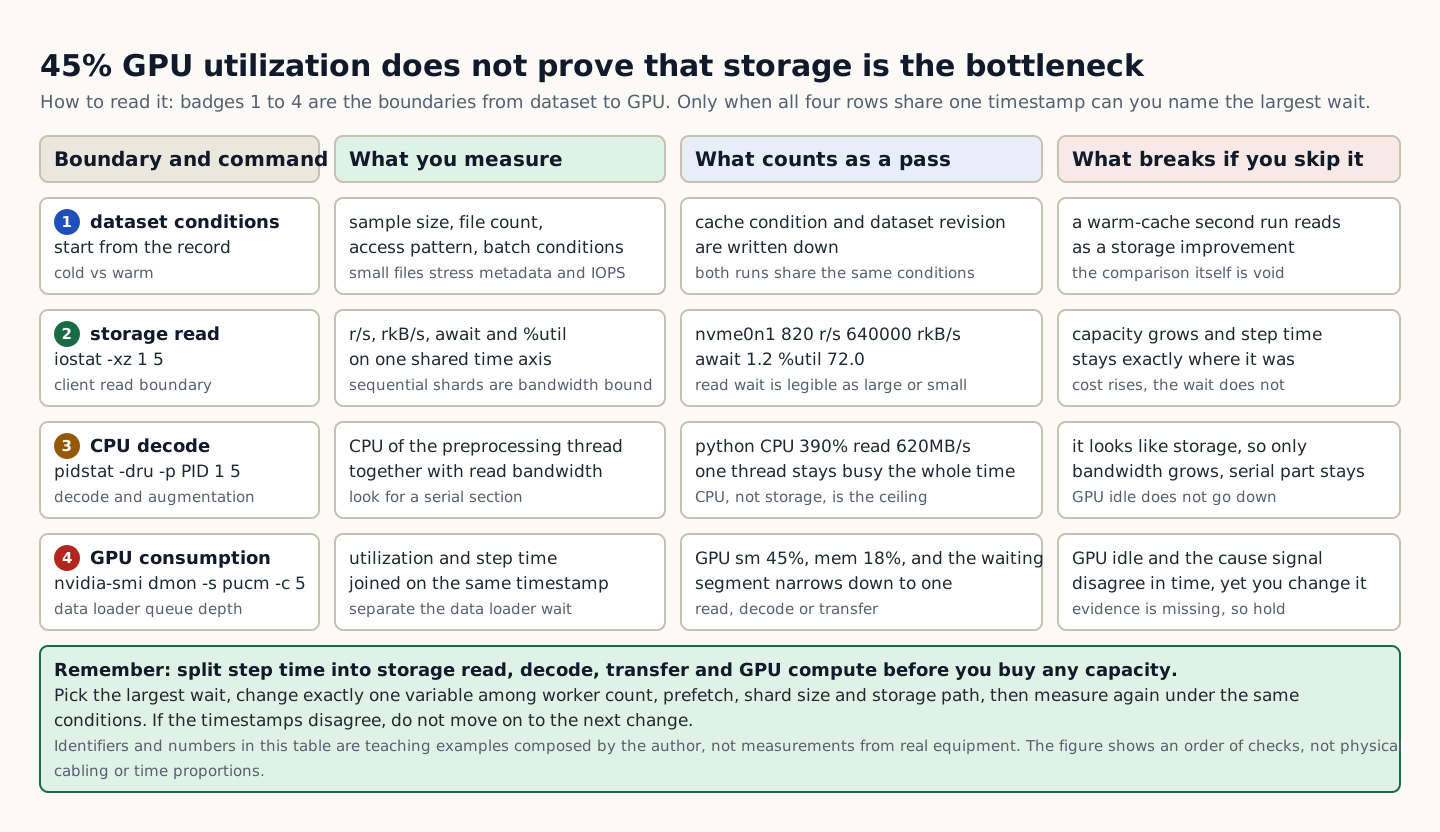
A checklist table comparing four boundaries (dataset conditions, storage read, CPU decode, and GPU consumption) by command, measured item, pass criterion, and the symptom that appears when the boundary is skipped
How to read the figure The table lists the four boundaries from dataset to GPU from top to bottom. Read each row across, from left to right, as boundary and command, what is measured, what counts as a pass, and what breaks if the boundary is skipped. The values in the third column (nvme0n1 820 r/s·await 1.2·%util 72.0, python CPU 390%·read 620MB/s, GPU sm 45%·mem 18%) are the basis for the pass verdict, and the fourth column is the symptom left when that boundary is skipped. The records in all four rows must be tied to the same timestamp; if the times of GPU idle and the causal signal do not line up, the evidence is insufficient, so do not move on to the next change. The final green box states the rule: break step time down into storage read, decode, transfer, and GPU compute, then change only one variable among worker count, prefetch, shard size, and storage path, and measure again under the same conditions. Colors and badges only distinguish columns and order, so the figure can be read without distinguishing colors. The identifiers and numbers in the table are training examples composed by the author, not values measured on real equipment, and the figure shows only the order of checks, not physical cabling or time proportions. Source: composed by the author based on fio documentation · PyTorch Data Loading.
Why does this happen?
Large sequential shards are sensitive to bandwidth, while small files and random samples are sensitive to metadata, IOPS, and latency. Compression, decode, and augmentation can create a CPU bottleneck that looks like a storage bottleneck.
When is it a problem?
If GPU idle time and the causal signal do not line up in time, there are insufficient grounds to proceed.
Common beginner misconceptions
Do not mix a single warm-cache result with cold-start results. Record the cache conditions and the dataset revision.
How to verify it yourself
Record the sample size, the file count, the access pattern, and the batch conditions. Collect the client read bandwidth, IOPS, latency, and cache hit rate.
To summarize this sectionYou succeed when you split the step time into storage read, decode, transfer, and GPU compute segments and present the largest wait along with an experiment to verify it.

CHAPTER 1 / 5

Start the check at the dataset

Do not guess the cause and start by changing settings. If you group the following evidence into records from the same time window, another operator can reproduce the boundary at which the expected state broke.

1. Record the sample size, file count, access pattern, and batch conditions. 2. Collect client read bandwidth, IOPS, latency, and cache hits. 3. Check the CPU decode time and the data loader queue depth. 4. Correlate GPU utilization and step time on the same timestamp.

CHAPTER 2 / 5

Pins down the lab target for the host path

Commands for reproducing the isolated environment · do not run them in the browser
iostat -xz 1 5
pidstat -dru -p $(pgrep -n python) 1 5
nvidia-smi dmon -s pucm -c 5

CHAPTER 3 / 5

Distinguish the output of the transfer path from what it means

Expected output for training · not an actual measurement
Device r/s rkB/s await %util
nvme0n1 820 640000 1.2 72.0
# python CPU 390%, read 620MB/s
# GPU sm 45%, mem 18%

CHAPTER 4 / 5

Decides whether GPU consumption proceeds or stops

CHAPTER 5 / 5

Re-verify recovery of data paths of AI workloads

CONCRETE CASES

In a fixture with 45% GPU utilization, determine whether the real bottleneck is storage, CPU decode, or the loader workers.

Before adding storage just because GPU utilization is low, look at queue depth, CPU saturation, read throughput, and data loader wait on the same time axis.

Wrong responses and boundaries to check

Do not mix a single warm-cache result with cold-start results. Record the cache conditions and the dataset revision.

After finding the bottleneck boundary, change only one variable: the worker count, prefetching, the shard size or the storage path. Compare step time and resource signals before and after under the same conditions. After recovery, measure again with the same commands and the same success criteria. Do not close an incident just because things appear normal.

INTERACTIVE LAB 1 / 2

Lab 1 · Find the basis for a verdict in the output

Enter values in the browser and check the execution results and the failure and recovery paths. No commands are ever sent to real equipment or the NAS.

Lab scenario:: In a fixture with 45% GPU utilization, determine whether the real bottleneck is storage, CPU decode, or the loader worker. Instructions:: In the browser, read the training output below and write a verdict. Do not send the commands to real equipment. To reproduce the commands separately, prepare an approved isolated environment with the relevant tools and example files. Save the entire output, and if GPU idle time and the suspected cause signal do not line up in time, do not move on to the next change.

Device r/s rkB/s await %util
nvme0n1 820 640000 1.2 72.0
# python CPU 390%, read 620MB/s
# GPU sm 45%, mem 18%

The point is not to memorize the values themselves but to confirm at which boundary the storage queue, the CPU decode, and the GPU idle time occur at the same moment. The values shown are reproduced examples for training, not measurements taken on real equipment. Identifiers and values can differ by device, driver, and cluster.

INTERACTIVE LAB 2 / 2

Lab 2 · Plan for stopping and recovery

Enter values in the browser and check the execution results and the failure and recovery paths. No commands are ever sent to real equipment or the NAS.

Do not mix a single warm-cache result with cold-start results. Record the cache conditions and the dataset revision.

KEY TERMS

Key terms in this unit

Data path
The actual path that carries stored data through the reader, CPU processing, and memory to the GPU input.

UNIT WORKBOOK

Exercises and worksheets for applying concepts to new situations

Start by checking basic principles, then expand to practical workplace decisions. After submitting an answer, you can see why every option is correct or incorrect, not just the correct answer.

Document the stop conditions and recovery evidence for data paths of AI workloads in a work record.

PERSONAL WORKSHEET

A learning worksheet you adapt to your own environment

Your input remains only on the current browser screen and is not stored or transmitted externally. Use categories and pseudonyms instead of actual sensitive information.

OFFICIAL SOURCES

Verify against official sources

Reviewed against official documentation and training output. Commands and performance tests on real hardware are unconfirmed.

CORE UNIT 2 / 4

Local NVMe and shared storage

Compare the consistency, performance, and failure domain of local disk, NFS, and NAS.

Difficulty
Intermediate
Structure
Lessons 5 · Labs 2 · Assessment

Diagrams and tables: composed by the author using each lesson's official primary sources. Find the originals and review dates at the end of that lesson.

PREREQUISITE CHECK

Three things to check before reading

This is not a test of memorized answers. Think about each question first, then open the explanation to review the foundational concepts used in this course.

1Does this unit send commands to real equipment?

No. Read the training output in the browser and make the judgment there. Any separate reproduction is done only in an approved isolated environment.

2What permissions and environment must you confirm before the lab?

An isolated dataset and a read-only production inventory. Storage lab 203.0.113.0/24.

3What evidence did you record in the previous unit, "Data paths of AI workloads"?

Success means splitting step time into storage read, decode, transfer, and GPU compute segments, and presenting the largest wait along with an experiment to verify it.

TEXTBOOK GUIDE

Main text that covers each concept from its background to the criteria for judging it

We explain the material section by section so readers new to IT can connect causes and effects without memorizing terms.

  1. Explain the components and failure boundaries of Local NVMe and shared storage with a diagram.
  2. Judge the state of Local NVMe and shared storage from command output and observed values.
  3. Write the stop conditions and recovery evidence for Local NVMe and shared storage into a work record.
Local NVMe and shared storage Lab environment and safety boundaries
HardwareNVMe·NFS·Ceph/S3 fixture
SoftwareUbuntu 24.04·fio 3.x·Ceph client·AWS CLI
Required permissionsAn isolated dataset and a read-only production inventory
Networkingstorage lab 203.0.113.0/24

Reviewed against official documentation and training output. Commands and performance tests on real hardware are unconfirmed.

Applies to version: fio 3.x · Ceph 18.x fixture · Manuscript review date: 2026-09-01

CONCEPT FLOW

How the chapters connect

The chapters are not isolated short answers to memorize. Follow them from left to right to see how each chapter's concepts support the next decision.

  1. 1.Start the check at the workload requirements
  2. 2.Pins down the lab target for local NVMe
  3. 3.Distinguishes NFS and NAS output from its meaning
  4. 4.Make the go/stop decision on the selection evidence
  5. 5.Re-verify recovery of Local NVMe and shared storage
Local NVMe and shared storage: the overall map. If you lose track while reading the detailed explanations and chapters below, return to this sequence.

CONTROLLED EXPLANATION

Follow the evidence to check, one step at a time

Current explanation · 1/5 · Start the check at the workload requirements

Up next: Pins down the lab target for local NVMe

  1. Start the check at the workload requirements

    Do not guess the cause and start by changing settings. If you group the following evidence into records from the same time window, another operator can reproduce the boundary at which the expected state broke.

  2. Pins down the lab target for local NVMe

    Lab scenario:: Place the scratch and checkpoint workloads on local NVMe and NFS, and write the rationale for the choice. Instructions:: In the browser, read the training output below and write a verdict. Do not send the commands to real equipment. To reproduce the commands separately, prepare an approved isolated environment with the relevant tools and example files. Save the entire output, and if the data lifetime or mount semantics are undecided, do not move on to the next change.

  3. Distinguishes NFS and NAS output from its meaning

    The point is not to memorize the values themselves but to confirm that the real data path and the filesystem/mount semantics match the design choice. The values shown are reproduced examples for training, not measurements taken on real equipment. Identifiers and values can differ by device, driver, and cluster.

  4. Make the go/stop decision on the selection evidence

    Success means stating the placement and mount options, including the regeneration path for scratch and the shared and recovery path for checkpoints. Record the execution time, target identity, commands used, key output, verdict, and next action together in the result.

  5. Re-verify recovery of Local NVMe and shared storage

    If there is a mount option mismatch or a stale handle, stop application writes and preserve the client and server logs. Rather than forcing an unmount on your own, reconnect by following the owner and failover procedure, then confirm integrity. After recovery, measure again with the same commands and the same success criteria. Do not close an incident just because things appear normal.

Conceptual explanation 01

Compare the trade-offs between local performance and shared-storage recovery

Scratch (regenerable working data): temporary results that can be rebuilt from the source; it is not the place to keep the only copy for recovery.

Local NVMe gives high locality and performance, but the data becomes tied to node failures and to scheduling. NFS/NAS gives a shared namespace, but the server, network, and mount options become a common failure domain.

Filesystem cache and sync semantics, file locking, and UID/GID mapping all affect application correctness. Seeing the same path is not the same as several clients observing the same ordering and durability.

The choice starts from data lifetime, whether the data can be regenerated, the number of producers and consumers, and the failover and restore targets, not from which option is faster.

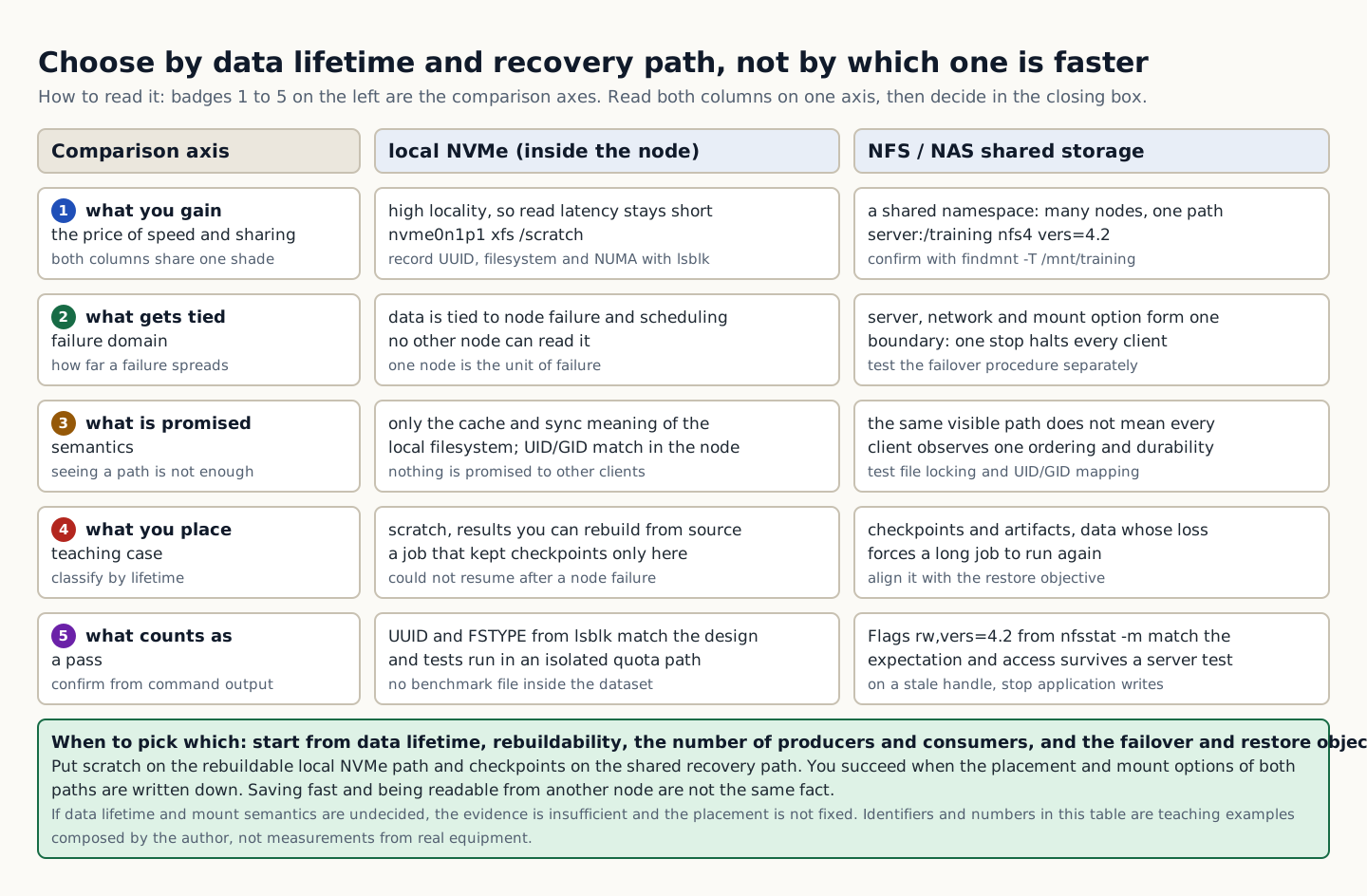
In the training example a job that stored checkpoints only on node-local NVMe could not resume after a node failure. Saving quickly and being readable from another node are different facts. Separate the storage paths for regenerable scratch data and for checkpoints whose loss forces a long job to be redone. Even if you choose shared storage, test server failure and permission mapping separately.

A table comparing local NVMe with NFS or NAS shared storage on five axes (performance, failure domain, semantics, placement, and pass criterion) and choosing by data lifetime and recovery path
How to read the figure Badges 1 to 5 in the left column are the comparison axes; for each axis, read the local NVMe column in the middle and the NFS/NAS shared storage column on the right side by side. Row 1 is what you get (nvme0n1p1 xfs /scratch, server:/training nfs4 vers=4.2), row 2 is the failure domain things are bound to, row 3 is what the semantics promise, row 4 is what to place there, and row 5 is what counts as a pass. The basis for a pass verdict is in row 5: whether the UUID and FSTYPE in the lsblk output match the design and the test was run in an isolated quota path, and whether Flags rw,vers=4.2 from nfsstat -m matches expectations and access tests pass after a server failure. Both columns are drawn at the same brightness, so color does not imply superiority, and the figure can be read without distinguishing colors. The final green box is the decision rule: start not from which option is faster but from data lifetime, whether data can be regenerated, the number of producers and consumers, and failover and restore objectives; put scratch on a regenerable path and checkpoints on a shared, recoverable path. If data lifetime and mount semantics are undecided, there is not enough basis to proceed, so do not finalize placement. The identifiers and numbers in the table are training examples composed by the author, not values measured on real equipment, and the figure shows only the rationale for the choice, not physical cabling. Source: composed by the author based on Linux NFS Documentation · fio documentation.
Why does this happen?
Filesystem cache and sync semantics, file locking, and UID/GID mapping affect application correctness. Seeing the same path is not the same as several clients observing the same ordering and durability.
When is it a problem?
If the data lifetime or mount semantics are undecided, there are insufficient grounds to proceed.
Common beginner misconceptions
Do not create benchmark files in a production dataset directory. Use an isolated path with a defined quota and deletion scope.
How to verify it yourself
Classify the lifetime and owner of scratch, dataset, checkpoint, and artifact data. Record the local device UUID, filesystem, mount options, and NUMA location.
To summarize this sectionYou succeed when you specify the placement and mount options, including a regeneration path for scratch and a shared recovery path for checkpoints.

CHAPTER 1 / 5

Start the check at the workload requirements

Do not guess the cause and start by changing settings. If you group the following evidence into records from the same time window, another operator can reproduce the boundary at which the expected state broke.

1. Classify the lifetime and owner of scratch, dataset, checkpoint, and artifact data. 2. Record the local device UUID, filesystem, mount options, and NUMA location. 3. Check the NFS server, export, protocol, mount options, and identity mapping. 4. Test data access and the recovery procedure after a node or server failure.

CHAPTER 2 / 5

Pins down the lab target for local NVMe

Commands for reproducing the isolated environment · do not run them in the browser
findmnt -T /mnt/training -o SOURCE,FSTYPE,OPTIONS,TARGET
lsblk -o NAME,UUID,FSTYPE,MOUNTPOINTS
nfsstat -m

CHAPTER 3 / 5

Distinguishes NFS and NAS output from its meaning

Expected output for training · not an actual measurement
SOURCE server:/training FSTYPE nfs4 OPTIONS rw,vers=4.2,... TARGET /mnt/training
nvme0n1p1 UUID-... xfs /scratch
/mnt/training from server:/training Flags: rw,vers=4.2,...

CHAPTER 4 / 5

Make the go/stop decision on the selection evidence

CHAPTER 5 / 5

Re-verify recovery of Local NVMe and shared storage

CONCRETE CASES

Place the two workloads, scratch and checkpoint, onto local NVMe and NFS and write down the reasoning for your choice.

The choice starts from data lifetime, whether the data can be regenerated, the number of producers and consumers, and the failover and restore targets, not from which option is faster.

Wrong responses and boundaries to check

Do not create benchmark files in a production dataset directory. Use an isolated path with a defined quota and deletion scope.

If there is a mount option mismatch or a stale handle, stop application writes and preserve the client and server logs. Rather than forcing an unmount on your own, reconnect by following the owner and failover procedure, then confirm integrity. After recovery, measure again with the same commands and the same success criteria. Do not close an incident just because things appear normal.

INTERACTIVE LAB 1 / 2

Lab 1 · Find the basis for a verdict in the output

Enter values in the browser and check the execution results and the failure and recovery paths. No commands are ever sent to real equipment or the NAS.

Lab scenario:: Place the scratch and checkpoint workloads on local NVMe and NFS, and write the rationale for the choice. Instructions:: In the browser, read the training output below and write a verdict. Do not send the commands to real equipment. To reproduce the commands separately, prepare an approved isolated environment with the relevant tools and example files. Save the entire output, and if the data lifetime or mount semantics are undecided, do not move on to the next change.

SOURCE server:/training FSTYPE nfs4 OPTIONS rw,vers=4.2,... TARGET /mnt/training
nvme0n1p1 UUID-... xfs /scratch
/mnt/training from server:/training Flags: rw,vers=4.2,...

The point is not to memorize the values themselves but to confirm that the real data path and the filesystem/mount semantics match the design choice. The values shown are reproduced examples for training, not measurements taken on real equipment. Identifiers and values can differ by device, driver, and cluster.

INTERACTIVE LAB 2 / 2

Lab 2 · Plan for stopping and recovery

Enter values in the browser and check the execution results and the failure and recovery paths. No commands are ever sent to real equipment or the NAS.

Do not create benchmark files in a production dataset directory. Use an isolated path with a defined quota and deletion scope.

KEY TERMS

Key terms in this unit

Scratch (regenerable working data)
A temporary result that can be regenerated from the source, not the place to keep the only copy for recovery.

UNIT WORKBOOK

Exercises and worksheets for applying concepts to new situations

Start by checking basic principles, then expand to practical workplace decisions. After submitting an answer, you can see why every option is correct or incorrect, not just the correct answer.

Write the stop conditions and recovery evidence for Local NVMe and shared storage into a work record.

PERSONAL WORKSHEET

A learning worksheet you adapt to your own environment

Your input remains only on the current browser screen and is not stored or transmitted externally. Use categories and pseudonyms instead of actual sensitive information.

OFFICIAL SOURCES

Verify against official sources

Reviewed against official documentation and training output. Commands and performance tests on real hardware are unconfirmed.

CORE UNIT 3 / 4

Parallel filesystems and object storage

Judge the conditions for choosing among Ceph, S3, and a parallel filesystem.

Difficulty
Intermediate
Structure
Lessons 5 · Labs 2 · Assessment

Diagrams and tables: composed by the author using each lesson's official primary sources. Find the originals and review dates at the end of that lesson.

PREREQUISITE CHECK

Three things to check before reading

This is not a test of memorized answers. Think about each question first, then open the explanation to review the foundational concepts used in this course.

1Does this unit send commands to real equipment?

No. Read the training output in the browser and make the judgment there. Any separate reproduction is done only in an approved isolated environment.

2What permissions and environment must you confirm before the lab?

An isolated dataset and a read-only production inventory. Storage lab 203.0.113.0/24.

3What evidence did you record in the previous unit, "Local NVMe and shared storage"?

Success means stating the placement and mount options, including the regeneration path for scratch and the shared and recovery path for checkpoints.

TEXTBOOK GUIDE

Main text that covers each concept from its background to the criteria for judging it

We explain the material section by section so readers new to IT can connect causes and effects without memorizing terms.

  1. Explain the components and failure boundaries of parallel filesystems and object storage using a diagram.
  2. Judge the state of parallel filesystems and object storage from command output and observed values.
  3. Document the stop conditions and recovery evidence for parallel filesystems and object storage in a work record.
Parallel filesystems and object storage Lab environment and safety boundaries
HardwareNVMe·NFS·Ceph/S3 fixture
SoftwareUbuntu 24.04·fio 3.x·Ceph client·AWS CLI
Required permissionsAn isolated dataset and a read-only production inventory
Networkingstorage lab 203.0.113.0/24

Reviewed against official documentation and training output. Commands and performance tests on real hardware are unconfirmed.

Applies to version: fio 3.x · Ceph 18.x fixture · Manuscript review date: 2026-09-01

CONCEPT FLOW

How the chapters connect

The chapters are not isolated short answers to memorize. Follow them from left to right to see how each chapter's concepts support the next decision.

  1. 1.Start the checks at requirement classification
  2. 2.Pins down the lab target for data placement
  3. 3.Distinguishes metadata output from its meaning
  4. 4.Decide whether to proceed or stop at the recovery boundary
  5. 5.Re-verify recovery for parallel filesystems and object storage
Parallel filesystems and object storage: the overall map. If you lose track while reading the detailed explanations and chapters below, return to this sequence.

CONTROLLED EXPLANATION

Follow the evidence to check, one step at a time

Current explanation · 1/5 · Start the checks at requirement classification

Up next: Pins down the lab target for data placement

  1. Start the checks at requirement classification

    Do not guess the cause and start by changing settings. If you group the following evidence into records from the same time window, another operator can reproduce the boundary at which the expected state broke.

  2. Pins down the lab target for data placement

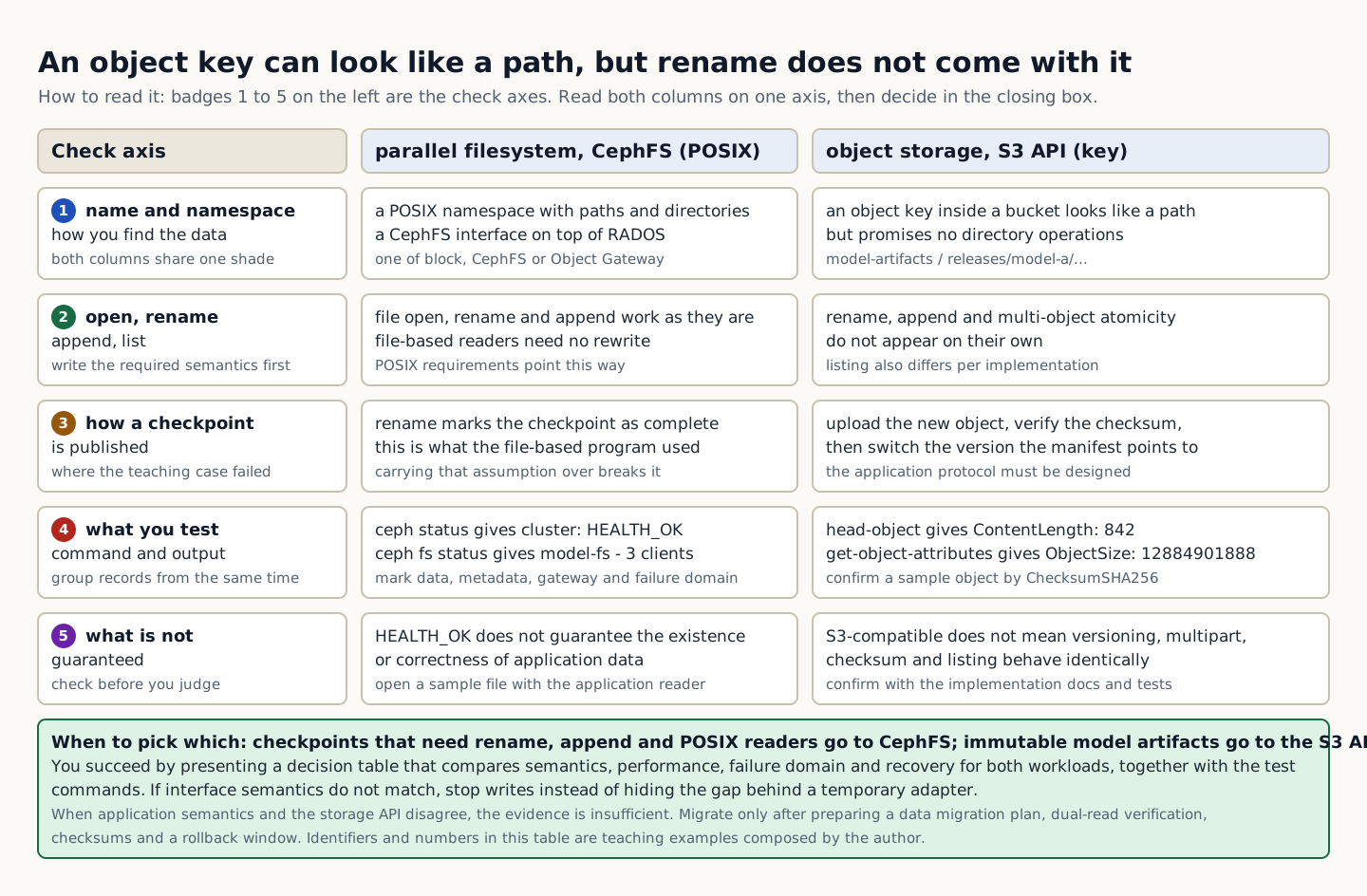
    Lab scenario:: Review a design that puts checkpoints on CephFS and immutable model artifacts behind an S3 API, and explain the risks of the opposite choice. Instructions:: In the browser, read the training output below and write a verdict. Do not send the commands to real equipment. To reproduce the commands separately, prepare an approved isolated environment with the relevant tools and example files. Save the entire output, and if the application semantics and the storage API do not agree, do not move on to the next change.

  3. Distinguishes metadata output from its meaning

    The point is not to memorize the values themselves but to confirm that cluster health, the filesystem client, object identity, and checksums are verified on the interface you chose. The values shown are reproduced examples for training, not measurements taken on real equipment. Identifiers and values can differ by device, driver, and cluster.

  4. Decide whether to proceed or stop at the recovery boundary

    The task is complete when you present a decision table comparing the semantics, performance, failure domain, and recovery of the two workloads, along with the test commands. Record the execution time, target identity, commands used, key output, verdict, and next action together in the result.

  5. Re-verify recovery for parallel filesystems and object storage

    If the interface semantics do not match, stop writes instead of hiding the mismatch behind a temporary adapter. Migrate only after preparing a data migration plan, dual-read verification, checksums, and a rollback window. After recovery, measure again with the same commands and the same success criteria. Do not close an incident just because things appear normal.

Conceptual explanation 01

Distinguish the data and metadata boundaries of POSIX and object APIs

Object key: the name used to find an object within a bucket; it does not guarantee the same operation semantics as a POSIX file path.

A parallel filesystem distributes file data and metadata across multiple storage targets and provides a POSIX namespace. Object storage centers on keys and an API and provides scalability and durability, but it does not promise file rename and append semantics as such.

Ceph provides block, CephFS, and Object Gateway on top of RADOS, and each interface has different consistency and failure boundaries. The application's access pattern and correctness requirements determine the interface choice.

Do not assume from the phrase S3-compatible alone that every behavior matches AWS S3. Verify versioning, multipart, checksum, listing, and authentication behavior against the actual implementation's documentation and with tests.

In the training example, a file-based program completed checkpoint publication with rename, and the same assumption was kept after moving to an object API. Even if object keys look like directories, rename, append, and multi-object atomicity do not come automatically. You must design an application protocol, for example by uploading a new object, verifying its checksum, and then switching the version the manifest points to. Confirm which features are actually provided through the documentation and tests of the implementation you use.

A table comparing the POSIX semantics of CephFS with the object key semantics of the S3 API on five axes: naming, operations, how a checkpoint is published, test commands, and what is not guaranteed
How to read the figure Badges 1 to 5 in the left column are the check axes; for each axis, read the parallel filesystem (CephFS) column in the middle and the object storage (S3 API) column on the right side by side. Row 1 asks how data is located, row 2 whether open, rename, append, and list work as is, row 3 how a checkpoint is published, row 4 what to test, and row 5 what is not guaranteed. Row 3 is the key point of this figure. The file-based program marked completion with rename, but with objects, rename, append, and multi-object atomicity do not come automatically, so you must design an application protocol that uploads a new object, verifies its checksum, and then switches the version the manifest points to. The test evidence is the command output in row 4 (cluster: HEALTH_OK, model-fs - 3 clients, ContentLength: 842, ObjectSize: 12884901888, ChecksumSHA256). Row 5 states the limits: HEALTH_OK does not guarantee the correctness of application data, and S3-compatible does not mean identical versioning, multipart, checksum, and listing behavior. Both columns are drawn at the same brightness, so color does not imply superiority, and the figure can be read without distinguishing colors. The final green box is the decision rule: place checkpoints that need rename, append, and POSIX readers on CephFS and immutable model artifacts on the S3 API, and if the semantics do not match, stop writes instead of hiding the gap behind a temporary adapter. The identifiers and numbers in the table are training examples composed by the author, not values measured on real equipment. Source: composed by the author based on Ceph Architecture · Ceph Object Gateway · Amazon S3 User Guide.
Why does this happen?
Ceph provides block, CephFS, and Object Gateway on top of RADOS, and each interface has different consistency and failure boundaries. The application's access pattern and correctness requirements determine the interface choice.
When is it a problem?
If you see a mismatch between application semantics and the storage API, there are insufficient grounds to proceed.
Common beginner misconceptions
HEALTH_OK does not guarantee that application data exists or is correct. Check representative objects and files with checksums and the application's own reader.
How to verify it yourself
Write down the open, rename, append, and list semantics the application requires. Measure the file/object size distribution and the number of concurrent clients.
To summarize this sectionYou succeed when you present a decision table comparing the semantics, performance, failure domain, and recovery of the two workloads, along with the test commands.

CHAPTER 1 / 5

Start the checks at requirement classification

Do not guess the cause and start by changing settings. If you group the following evidence into records from the same time window, another operator can reproduce the boundary at which the expected state broke.

1. Write down the open/rename/append/list semantics the application requires. 2. Measure the file/object size distribution and the number of concurrent clients. 3. Mark the data, metadata, and gateway components and their failure domains. 4. Test the checksum, versioning, replication, and the restore method.

CHAPTER 2 / 5

Pins down the lab target for data placement

Commands for reproducing the isolated environment · do not run them in the browser
ceph status
ceph fs status
aws s3api head-object --bucket model-artifacts --key releases/model-a/manifest.json
aws s3api get-object-attributes --bucket model-artifacts --key releases/model-a/weights.bin --object-attributes Checksum,ObjectSize

CHAPTER 3 / 5

Distinguishes metadata output from its meaning

Expected output for training · not an actual measurement
cluster: HEALTH_OK
model-fs - 3 clients
ContentLength: 842
ObjectSize: 12884901888
ChecksumSHA256: ...

CHAPTER 4 / 5

Decide whether to proceed or stop at the recovery boundary

CHAPTER 5 / 5

Re-verify recovery for parallel filesystems and object storage

CONCRETE CASES

Review a design that places checkpoints on CephFS and immutable model artifacts on the S3 API, and explain the risks of the opposite choice.

Do not assume from the phrase S3-compatible alone that every behavior matches AWS S3. Verify versioning, multipart, checksum, listing, and authentication behavior against the actual implementation's documentation and with tests.

Wrong responses and boundaries to check

HEALTH_OK does not guarantee the existence or correctness of application data. Verify representative objects and files with checksums and with the application reader.

If the interface semantics do not match, stop writes instead of hiding the mismatch behind a temporary adapter. Migrate only after preparing a data migration plan, dual-read verification, checksums, and a rollback window. After recovery, measure again with the same commands and the same success criteria. Do not close an incident just because things appear normal.

INTERACTIVE LAB 1 / 2

Lab 1 · Find the basis for a verdict in the output

Enter values in the browser and check the execution results and the failure and recovery paths. No commands are ever sent to real equipment or the NAS.

Lab scenario:: Review a design that puts checkpoints on CephFS and immutable model artifacts behind an S3 API, and explain the risks of the opposite choice. Instructions:: In the browser, read the training output below and write a verdict. Do not send the commands to real equipment. To reproduce the commands separately, prepare an approved isolated environment with the relevant tools and example files. Save the entire output, and if the application semantics and the storage API do not agree, do not move on to the next change.

cluster: HEALTH_OK
model-fs - 3 clients
ContentLength: 842
ObjectSize: 12884901888
ChecksumSHA256: ...

The point is not to memorize the values themselves but to confirm that cluster health, the filesystem client, object identity, and checksums are verified on the interface you chose. The values shown are reproduced examples for training, not measurements taken on real equipment. Identifiers and values can differ by device, driver, and cluster.

INTERACTIVE LAB 2 / 2

Lab 2 · Plan for stopping and recovery

Enter values in the browser and check the execution results and the failure and recovery paths. No commands are ever sent to real equipment or the NAS.

HEALTH_OK does not guarantee the existence or correctness of application data. Verify representative objects and files with checksums and with the application reader.

KEY TERMS

Key terms in this unit

Object key
The name used to locate an object within a bucket; it does not promise the same operational semantics as a POSIX file path.

UNIT WORKBOOK

Exercises and worksheets for applying concepts to new situations

Start by checking basic principles, then expand to practical workplace decisions. After submitting an answer, you can see why every option is correct or incorrect, not just the correct answer.

Document the stop conditions and recovery evidence for parallel filesystems and object storage in a work record.

PERSONAL WORKSHEET

A learning worksheet you adapt to your own environment

Your input remains only on the current browser screen and is not stored or transmitted externally. Use categories and pseudonyms instead of actual sensitive information.

OFFICIAL SOURCES

Verify against official sources

Reviewed against official documentation and training output. Commands and performance tests on real hardware are unconfirmed.

CORE UNIT 4 / 4

Performance, backup, and restore verification

Define the fio conditions along with RPO and RTO, and keep evidence of an actual restore.

Difficulty
Intermediate
Structure
Lessons 5 · Labs 2 · Assessment

Diagrams and tables: composed by the author using each lesson's official primary sources. Find the originals and review dates at the end of that lesson.

PREREQUISITE CHECK

Three things to check before reading

This is not a test of memorized answers. Think about each question first, then open the explanation to review the foundational concepts used in this course.

1Does this unit send commands to real equipment?

No. Read the training output in the browser and make the judgment there. Any separate reproduction is done only in an approved isolated environment.

2What permissions and environment must you confirm before the lab?

An isolated dataset and a read-only production inventory. Storage lab 203.0.113.0/24.

3What evidence did you record in the previous unit, "Parallel filesystems and object storage"?

The task is complete when you present a decision table comparing the semantics, performance, failure domain, and recovery of the two workloads, along with the test commands.

TEXTBOOK GUIDE

Main text that covers each concept from its background to the criteria for judging it

We explain the material section by section so readers new to IT can connect causes and effects without memorizing terms.

  1. Explain the components and failure boundaries of performance, backup, and restore verification using a diagram.
  2. Judge the state of performance, backup, and restore verification from command output and observed values.
  3. Document the stop conditions and recovery evidence for performance, backup, and restore verification in a work record.
Performance, backup, and restore verification Lab environment and safety boundaries
HardwareNVMe·NFS·Ceph/S3 fixture
SoftwareUbuntu 24.04·fio 3.x·Ceph client·AWS CLI
Required permissionsAn isolated dataset and a read-only production inventory
Networkingstorage lab 203.0.113.0/24

Reviewed against official documentation and training output. Commands and performance tests on real hardware are unconfirmed.

Applies to version: fio 3.x · Ceph 18.x fixture · Manuscript review date: 2026-09-01

CONCEPT FLOW

How the chapters connect

The chapters are not isolated short answers to memorize. Follow them from left to right to see how each chapter's concepts support the next decision.

  1. 1.Start the checks at the test contract
  2. 2.Fix the lab target for performance measurement
  3. 3.Distinguish the output of the isolated restore from its meaning
  4. 4.Decides whether the RPO and RTO proceed or stop
  5. 5.Re-verify recovery of performance, backup, and restore verification
Performance, backup, and restore verification: the overall map. If you lose track while reading the detailed explanations and chapters below, return to this sequence.

CONTROLLED EXPLANATION

Follow the evidence to check, one step at a time

Current explanation · 1/5 · Start the checks at the test contract

Up next: Fix the lab target for performance measurement

  1. Start the checks at the test contract

    Do not guess the cause and start by changing settings. If you group the following evidence into records from the same time window, another operator can reproduce the boundary at which the expected state broke.

  2. Fix the lab target for performance measurement

    Lab scenario:: Judge whether the SLO is met using the provided 4KiB random-read results, checkpoint sequential-write results, and restore log. Instructions:: In the browser, read the training output below and write a verdict. Do not send the commands to real equipment. To reproduce the commands separately, prepare an approved isolated environment with the relevant tools and example files. Save the entire output, and if the target path is undecided or a checksum does not match, do not move on to the next change.

  3. Distinguish the output of the isolated restore from its meaning

    The point is not to memorize the values themselves but to confirm that the tail latency of the stated workload and the integrity of the restored artifact are within target. The values shown are reproduced examples for training, not measurements taken on real equipment. Identifiers and values can differ by device, driver, and cluster.

  4. Decides whether the RPO and RTO proceed or stop

    You succeed when you compute RPO/RTO from a reproducible fio job, the raw JSON, the restore start and finish times, the checksum, and the application verification. Record the execution time, target identity, commands used, key output, verdict, and next action together in the result.

  5. Re-verify recovery of performance, backup, and restore verification

    If performance falls short, separate the client, network, server, and media layers and retest one variable at a time. If the restore checksum differs, halt the approval and first preserve the original snapshot and the transfer log. After recovery, measure again with the same commands and the same success criteria. Do not close an incident just because things appear normal.

Conceptual explanation 01

Combine the performance conditions and an actual restore into a single piece of approval evidence

RPO and RTO (recovery point and recovery time objectives): targets that respectively set the acceptable window of data loss and the time allowed until the service is restored.

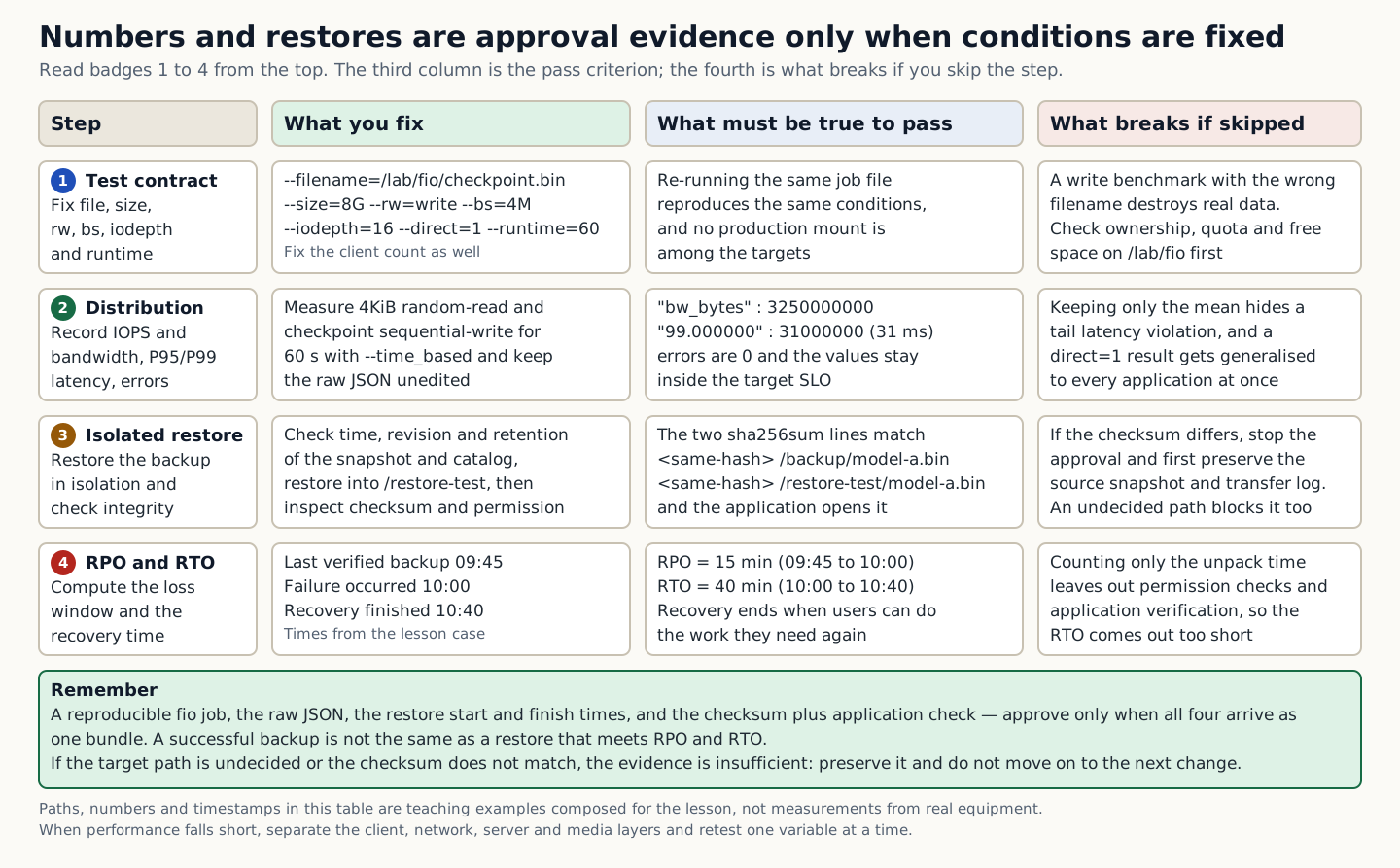
Storage performance numbers cannot be reproduced without the block size, read/write ratio, queue depth, number of files, number of clients, cache, and measurement duration. A successful backup is not the same as a successful restore that meets the Recovery Point Objective (RPO) and the Recovery Time Objective (RTO).

A performance test recreates the same conditions as the workload model and measures the distribution and the errors. A recovery test restores the data to an isolated location, verifies checksums, metadata, and application open, and then calculates the elapsed time and the point of loss.

Do not generalize an fio direct=1 result to all application performance. Run destructive write tests only against a stated test file or a dedicated device.

In the training example the last verified backup was at 09:45 and the failure occurred at 10:00. If recovery finished at 10:40, the verifiable loss window is 15 minutes and the time from failure to recovery is 40 minutes. Calculating service RTO from the time it took to unpack the backup file alone omits the permission and application verification time. Define the recovery end time as the moment users can perform the functions they need again.

A table that splits four steps (fixing the test conditions, measuring the performance distribution, isolated restore, and the RPO and RTO verdict) into the pass criterion and what breaks if the step is skipped.
How to read the figure Performance conditions and an actual restore are combined into a single set of approval evidence. The table has four rows, and badges 1 to 4 on the left give the order. The first column is the step, the second is the value fixed at that step, the third is what must be observed to pass, and the fourth is what breaks if the step is skipped. The values used for the verdict are in the third column: bw_bytes 3250000000, P99 31000000 ns, two matching sha256sum lines, and an RPO of 15 minutes with an RTO of 40 minutes. The last green box groups the four pieces of evidence required for approval into one bundle, and the two gray lines below it describe the nature of the values and how to retest if performance falls short. The paths, numbers, and timestamps in the table are training reproduction examples, not values measured on real equipment. If the target path is not yet determined or the checksums do not match, do not move on to the next change. Source: composed by the author based on fio documentation · Amazon S3 User Guide · K3s Backup and Restore.
Why does this happen?
A performance test recreates the same conditions as the workload model and measures the distribution and the errors. A recovery test restores the data to an isolated location, verifies the checksum, metadata, and application open, and then computes the elapsed time and the point of loss.
When is it a problem?
If you see an unconfirmed target path or a checksum mismatch, there are insufficient grounds to proceed.
Common beginner misconceptions
A write benchmark pointed at the wrong filename destroys real data. Check the ownership, quota, and free space of `/lab/fio`, and exclude production mounts.
How to verify it yourself
Fix the test file/path, size, runtime, rw, bs, iodepth, and number of clients. Record IOPS, bandwidth, P95/P99 latency, and errors together.
To summarize this sectionYou succeed when you compute RPO/RTO from a reproducible fio job, the raw JSON, the restore start and finish times, the checksum, and the application verification.

CHAPTER 1 / 5

Start the checks at the test contract

Do not guess the cause and start by changing settings. If you group the following evidence into records from the same time window, another operator can reproduce the boundary at which the expected state broke.

1. Pin the test file/path, size, runtime, rw, bs, iodepth, and number of clients. 2. Record IOPS, bandwidth, P95/P99 latency, and errors together. 3. Check the time, revision, and retention of the backup snapshot and the catalog. 4. After the isolated restore, measure the checksum, permissions, application load, and elapsed time.

CHAPTER 2 / 5

Fix the lab target for performance measurement

Commands for reproducing the isolated environment · do not run them in the browser
fio --name=checkpoint --ioengine=libaio --filename=/lab/fio/checkpoint.bin --size=8G --rw=write --bs=4M --iodepth=16 --direct=1 --runtime=60 --time_based --group_reporting --output-format=json
sha256sum /backup/model-a.bin /restore-test/model-a.bin

CHAPTER 3 / 5

Distinguish the output of the isolated restore from its meaning

Expected output for training · not an actual measurement
"write" : { "bw_bytes" : 3250000000, "clat_ns" : { "percentile" : { "99.000000" : 31000000 }}}
<same-hash>  /backup/model-a.bin
<same-hash>  /restore-test/model-a.bin

CHAPTER 4 / 5

Decides whether the RPO and RTO proceed or stop

CHAPTER 5 / 5

Re-verify recovery of performance, backup, and restore verification

CONCRETE CASES

Judge whether the SLO is met from the provided 4KiB random-read and checkpoint sequential-write results and the restore log.

Do not generalize an fio direct=1 result to all application performance. Run destructive write tests only against a stated test file or a dedicated device.

Wrong responses and boundaries to check

A write benchmark pointed at the wrong filename destroys real data. Check ownership, quota, and free space on `/lab/fio`, and exclude production mounts.

If performance falls short, separate the client, network, server, and media layers and retest one variable at a time. If the restore checksum differs, halt the approval and first preserve the original snapshot and the transfer log. After recovery, measure again with the same commands and the same success criteria. Do not close an incident just because things appear normal.

INTERACTIVE LAB 1 / 2

Lab 1 · Find the basis for a verdict in the output

Enter values in the browser and check the execution results and the failure and recovery paths. No commands are ever sent to real equipment or the NAS.

Lab scenario:: Judge whether the SLO is met using the provided 4KiB random-read results, checkpoint sequential-write results, and restore log. Instructions:: In the browser, read the training output below and write a verdict. Do not send the commands to real equipment. To reproduce the commands separately, prepare an approved isolated environment with the relevant tools and example files. Save the entire output, and if the target path is undecided or a checksum does not match, do not move on to the next change.

"write" : { "bw_bytes" : 3250000000, "clat_ns" : { "percentile" : { "99.000000" : 31000000 }}}
<same-hash>  /backup/model-a.bin
<same-hash>  /restore-test/model-a.bin

The point is not to memorize the values themselves but to confirm that the tail latency of the stated workload and the integrity of the restored artifact are within target. The values shown are reproduced examples for training, not measurements taken on real equipment. Identifiers and values can differ by device, driver, and cluster.

INTERACTIVE LAB 2 / 2

Lab 2 · Plan for stopping and recovery

Enter values in the browser and check the execution results and the failure and recovery paths. No commands are ever sent to real equipment or the NAS.

A write benchmark pointed at the wrong filename destroys real data. Check ownership, quota, and free space on /lab/fio, and exclude production mounts.

KEY TERMS

Key terms in this unit

RPO and RTO (recovery point and recovery time objectives)
Targets that separately define the acceptable window of data loss and the time allowed to restore service.

UNIT WORKBOOK

Exercises and worksheets for applying concepts to new situations

Start by checking basic principles, then expand to practical workplace decisions. After submitting an answer, you can see why every option is correct or incorrect, not just the correct answer.

Document the stop conditions and recovery evidence for performance, backup, and restore verification in a work record.

PERSONAL WORKSHEET

A learning worksheet you adapt to your own environment

Your input remains only on the current browser screen and is not stored or transmitted externally. Use categories and pseudonyms instead of actual sensitive information.

OFFICIAL SOURCES

Verify against official sources

Reviewed against official documentation and training output. Commands and performance tests on real hardware are unconfirmed.

DECISION ACTIVITY

The checkpoint save time doubled, but the average throughput is unchanged. What evidence comes next?

First write down the evidence you need and the stop criteria, then choose a verdict.

Choose an answer

THREE-LEVEL ASSESSMENT

From basic principles to operational decisions

When you submit an answer you can see why every option is right or wrong.

Basic Question 1

Which metrics matter for a dataset of small files?

Choose an answer
Apply Question 2

What must you check before using object storage like a POSIX filesystem?

Choose an answer
Capstone Question 3

Why can a successful backup job alone not justify approving recovery?

Choose an answer

LEARNING RECORD

Have you reviewed the text, decision activities, and all explanations?

Completion status is stored only in this browser.