KoreaDevKNOWLEDGE SHARING

Content typeLearn

AI INFRASTRUCTURE · 09 / 12

Operations and security

Connect RBAC, secrets, backup, restore, upgrade, patching, and policy to change management and recovery evidence.

Difficulty
Intermediate
Structure
Core units 4 · Judgment activities · Three-stage assessment

NEW HIRE ONBOARDING

Start in the order you would receive your first assignment

So that even a new hire with no prior IT background can follow along, we start with the situation, the task, the evidence, and when to report, before difficult definitions.

  1. 01

    Read the situation in one sentence

    Apply identity, RBAC, and secrets, backup/restore, canary upgrade, and image, workload, network, and audit policies step by step, and verify break-glass as well.

  2. 02

    Today's assignment

    Write the stop conditions and recovery evidence for the Platform security baseline into a work record.

  3. 03

    Evidence that shows the work is complete

    Reviewed against official documentation and training output. Commands and performance tests on real hardware are unconfirmed.

  4. 04

    When to stop and ask a senior colleague

    During an urgent incident a developer requests cluster-admin. What is the correct response?

Unpack unfamiliar terms first

RBAC (Role-Based Access Control)
An approach that attaches roles to subjects to define which resources and actions are permitted.

Operational question for this course

How do you tie an operational change to least privilege, recoverability, and audit evidence?

Apply identity, RBAC, and secrets, backup/restore, canary upgrade, and image, workload, network, and audit policies step by step, and verify break-glass as well.

CORE UNIT 1 / 4

Identity and access control

Design least privilege for people, service accounts and RBAC.

Difficulty
Intermediate
Structure
Lessons 5 · Labs 2 · Assessment

Diagrams and tables: composed by the author using each lesson's official primary sources. Find the originals and review dates at the end of that lesson.

PREREQUISITE CHECK

Three things to check before reading

This is not a test of memorized answers. Think about each question first, then open the explanation to review the foundational concepts used in this course.

1Does this unit send commands to real equipment?

No. Read the training output in the browser and make the judgment there. Any separate reproduction is done only in an approved isolated environment.

2What permissions and environment must you confirm before the lab?

Separate lab security-admin and break-glass accounts. Separate the management network from workload namespaces.

3How do you record a value you have never seen before and a test you have not yet run?

Record it as unconfirmed. Distinguish expected training output from actual measurements, and do not fill in blanks with unapproved work.

TEXTBOOK GUIDE

Main text that covers each concept from its background to the criteria for judging it

We explain the material section by section so readers new to IT can connect causes and effects without memorizing terms.

  1. Explain the components and failure boundaries of Identity and access control with a diagram.
  2. Judge the state of Identity and access control from command output and observed values.
  3. Write the stop conditions and recovery evidence for Identity and access control into a work record.
Identity and access control Lab environment and safety boundaries
HardwareIsolated Kubernetes cluster · backup repository fixture
SoftwareKubernetes 1.31 fixture·K3s snapshot·policy engine
Required permissionsSeparate lab security-admin and break-glass accounts
NetworkingSeparating the management network from workload namespaces

Reviewed against official documentation and training output. Commands and performance tests on real hardware are unconfirmed.

Applies to version: Kubernetes RBAC API rbac.authorization.k8s.io/v1 · K3s v1.31 fixture · Manuscript review date: 2026-09-01

CONCEPT FLOW

How the chapters connect

The chapters are not isolated short answers to memorize. Follow them from left to right to see how each chapter's concepts support the next decision.

  1. 1.Start the check at the identity
  2. 2.Pins down the lab target for the role contract
  3. 3.Distinguish the output of the binding from what it means
  4. 4.Make the go/stop decision on the access evidence
  5. 5.Re-verify recovery of Identity and access control
Identity and access control: the overall map. If you lose track while reading the detailed explanations and chapters below, return to this sequence.

CONTROLLED EXPLANATION

Follow the evidence to check, one step at a time

Current explanation · 1/5 · Start the check at the identity

Up next: Pins down the lab target for the role contract

  1. Start the check at the identity

    Do not guess the cause and start by changing settings. If you group the following evidence into records from the same time window, another operator can reproduce the boundary at which the expected state broke.

  2. Pins down the lab target for the role contract

    Lab scenario:: Review an RBAC configuration that allows the model-reader service account only a specific ConfigMap and Pod logs, without permission to list secrets. Instructions:: In the browser, read the training output below and write a verdict. Do not send the commands to real equipment. To reproduce the commands separately, prepare an approved isolated environment with the relevant tools and example files. Save the entire output, and if you see a shared credential, a wildcard rule, or a missing owner, do not move on to the next change.

  3. Distinguish the output of the binding from what it means

    The point is not to memorize the values themselves but to confirm that the required actions are allowed while prohibited actions such as reading secrets are actually denied. The values shown are reproduced examples for training, not measurements taken on real equipment. Identifiers and values can differ by device, driver, and cluster.

  4. Make the go/stop decision on the access evidence

    Success means putting the identity inventory, the minimal Role, the Binding, the allow/deny tests, and the audit query in one change record. Record the execution time, target identity, commands used, key output, verdict, and next action together in the result.

  5. Re-verify recovery of Identity and access control

    If you find excess privilege, first check which tasks are in use and narrow it down with a canary binding. If an access failure occurs, use an audited break-glass path instead of a shared admin credential and revoke it as soon as the incident closes. After recovery, measure again with the same commands and the same success criteria. Do not close an incident just because things appear normal.

Conceptual explanation 01

Verify the access boundary from identity through to the allow and deny audit

RBAC (Role-Based Access Control): an approach that attaches roles to subjects to define which resources and actions are permitted.

Authentication determines who the caller is, and authorization determines what the caller may do. Only by separating people, workload service accounts, automation, and break-glass identities can you trace each credential's scope, lifetime, and owner.

An RBAC permission is built from a combination of verb, resource, namespace, and resourceName, and a RoleBinding attaches it to a subject. With wildcards and cluster-admin, the granted permissions can become broader than expected when new APIs are added.

Least privilege is not about shortening a list of requests; it is a two-way test that allows the actual work tasks and denies prohibited actions. Verify it with auth can-i and the audit log.

In the training example granting cluster-admin just to read logs also opens unnecessary permissions such as reading secrets. Narrow the required action to get on pods/log within a namespace. Passing only the allow test is not enough; also confirm that listing secrets is denied. The operator running the impersonation query needs their own permission too, so distinguish a failure of the test from a denial for the target role.
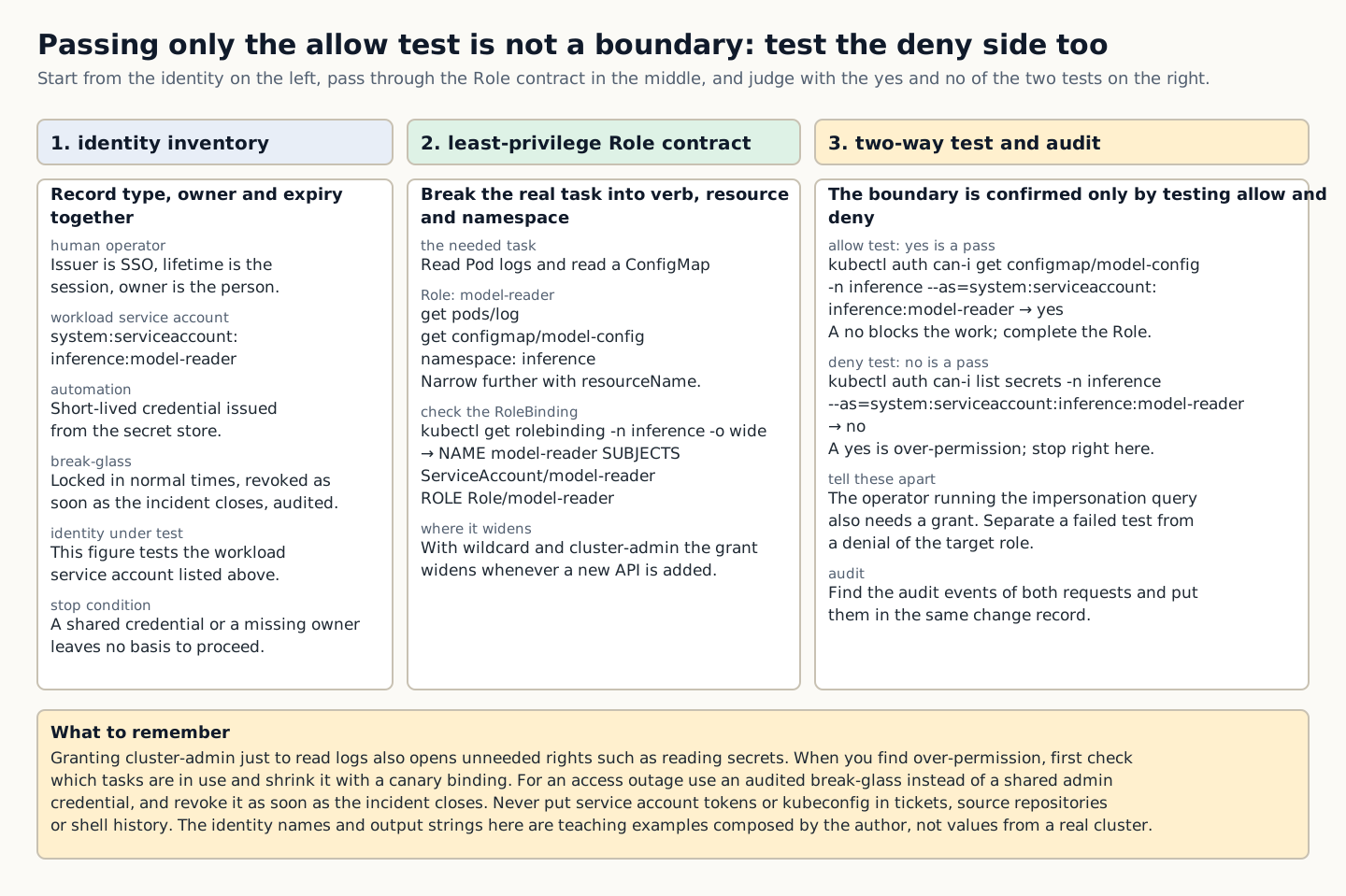
A figure that compares, in three columns, the identity inventory and least-privilege Role contract, the results of allow and deny tests, and the audit evidence
How to read the figure In the left column, check the type, owner, and lifetime of the human operator, workload service account, automation, and break-glass identities. In the middle column, compare the Role that breaks the actual task down into verb, resource, and namespace with the output of the RoleBinding that binds it to the subject. The two tests in the right column run in opposite directions: the allow test passes when the result is yes, and the deny test passes when the result is no. If the allow test returns no, work is blocked, so extend the Role; if the deny test returns yes, the permissions are excessive, so stop here. An impersonation query also requires permission for the operator running it, so distinguish a failure of the test itself from a denial for the target role. Evidence is complete once the audit events for both requests are found and added to the same change record. The identity names and output strings in the figure are training examples composed by the author, not values measured on a real cluster, and the figure can be read without distinguishing colors. Source: composed by the author based on Kubernetes Using RBAC Authorization · Kubernetes Service Accounts.
Why does this happen?
RBAC permissions are built from combinations of verb, resource, namespace, and resourceName, and a RoleBinding binds them to a subject. With wildcards and cluster-admin, permissions can become broader than expected when new APIs are added.
When is it a problem?
If you see shared credentials, a wildcard, or no owner, there are insufficient grounds to proceed.
Common beginner misconceptions
Do not put service account tokens or kubeconfig into tickets, source repositories, or shell history. Use short-lived credentials and a secret store.
How to verify it yourself
Inventory the identity type, owner, purpose, expiry, and issuer. Break the actual task down into verb, resource, and namespace.
To summarize this sectionYou succeed when you put the identity inventory, the minimal Role, the Binding, the allow/deny tests, and the audit query into one change record.

CHAPTER 1 / 5

Start the check at the identity

Do not guess the cause and start by changing settings. If you group the following evidence into records from the same time window, another operator can reproduce the boundary at which the expected state broke.

1. Inventory the identity type, owner, purpose, expiry, and issuer. 2. Break the actual task down into verb/resource/namespace. 3. Trace the subject and scope of the Role/ClusterRole and the Binding. 4. Test the allowed and prohibited tasks with impersonation and find the audit events.

CHAPTER 2 / 5

Pins down the lab target for the role contract

Commands for reproducing the isolated environment · do not run them in the browser
kubectl auth can-i get configmap/model-config -n inference --as=system:serviceaccount:inference:model-reader
kubectl auth can-i list secrets -n inference --as=system:serviceaccount:inference:model-reader
kubectl get rolebinding -n inference -o wide

CHAPTER 3 / 5

Distinguish the output of the binding from what it means

Expected output for training · not an actual measurement
yes
no
NAME model-reader SUBJECTS ServiceAccount/model-reader ROLE Role/model-reader

CHAPTER 4 / 5

Make the go/stop decision on the access evidence

CHAPTER 5 / 5

Re-verify recovery of Identity and access control

CONCRETE CASES

Review an RBAC setup that gives the model-reader service account no permission to list secrets and allows only a specific ConfigMap and Pod logs.

Least privilege is not about shortening a list of requests; it is a two-way test that allows the actual work tasks and denies prohibited actions. Verify it with `auth can-i` and the audit log.

Wrong responses and boundaries to check

Do not put service account tokens or kubeconfig into tickets, source repositories, or shell history. Use short-lived credentials and a secret store.

If you find excess privilege, first check which tasks are in use and narrow it down with a canary binding. If an access failure occurs, use an audited break-glass path instead of a shared admin credential and revoke it as soon as the incident closes. After recovery, measure again with the same commands and the same success criteria. Do not close an incident just because things appear normal.

INTERACTIVE LAB 1 / 2

Lab 1 · Find the basis for a verdict in the output

Enter values in the browser and check the execution results and the failure and recovery paths. No commands are ever sent to real equipment or the NAS.

Lab scenario:: Review an RBAC configuration that allows the model-reader service account only a specific ConfigMap and Pod logs, without permission to list secrets. Instructions:: In the browser, read the training output below and write a verdict. Do not send the commands to real equipment. To reproduce the commands separately, prepare an approved isolated environment with the relevant tools and example files. Save the entire output, and if you see a shared credential, a wildcard rule, or a missing owner, do not move on to the next change.

yes
no
NAME model-reader SUBJECTS ServiceAccount/model-reader ROLE Role/model-reader

The point is not to memorize the values themselves but to confirm that the required actions are allowed while prohibited actions such as reading secrets are actually denied. The values shown are reproduced examples for training, not measurements taken on real equipment. Identifiers and values can differ by device, driver, and cluster.

INTERACTIVE LAB 2 / 2

Lab 2 · Plan for stopping and recovery

Enter values in the browser and check the execution results and the failure and recovery paths. No commands are ever sent to real equipment or the NAS.

Do not put service account tokens or kubeconfig into tickets, source repositories, or shell history. Use short-lived credentials and a secret store.

KEY TERMS

Key terms in this unit

RBAC (Role-Based Access Control)
An approach that attaches roles to subjects to define which resources and actions are permitted.

UNIT WORKBOOK

Exercises and worksheets for applying concepts to new situations

Start by checking basic principles, then expand to practical workplace decisions. After submitting an answer, you can see why every option is correct or incorrect, not just the correct answer.

Write the stop conditions and recovery evidence for Identity and access control into a work record.

PERSONAL WORKSHEET

A learning worksheet you adapt to your own environment

Your input remains only on the current browser screen and is not stored or transmitted externally. Use categories and pseudonyms instead of actual sensitive information.

OFFICIAL SOURCES

Verify against official sources

Reviewed against official documentation and training output. Commands and performance tests on real hardware are unconfirmed.

CORE UNIT 2 / 4

Backup and restore

Verify recoverability with an isolated restore and RPO/RTO, not by the mere existence of a backup.

Difficulty
Intermediate
Structure
Lessons 5 · Labs 2 · Assessment

Diagrams and tables: composed by the author using each lesson's official primary sources. Find the originals and review dates at the end of that lesson.

PREREQUISITE CHECK

Three things to check before reading

This is not a test of memorized answers. Think about each question first, then open the explanation to review the foundational concepts used in this course.

1Does this unit send commands to real equipment?

No. Read the training output in the browser and make the judgment there. Any separate reproduction is done only in an approved isolated environment.

2What permissions and environment must you confirm before the lab?

Separate lab security-admin and break-glass accounts. Separate the management network from workload namespaces.

3What evidence did you record in the previous unit, "Identity and access control"?

Success means putting the identity inventory, the minimal Role, the Binding, the allow/deny tests, and the audit query in one change record.

TEXTBOOK GUIDE

Main text that covers each concept from its background to the criteria for judging it

We explain the material section by section so readers new to IT can connect causes and effects without memorizing terms.

  1. Explain the components and failure boundaries of backup and restore using a diagram.
  2. Judge the state of backup and restore from command output and observed values.
  3. Document the stop conditions and recovery evidence for backup and restore in a work record.
Backup and restore Lab environment and safety boundaries
HardwareIsolated Kubernetes cluster · backup repository fixture
SoftwareKubernetes 1.31 fixture·K3s snapshot·policy engine
Required permissionsSeparate lab security-admin and break-glass accounts
NetworkingSeparating the management network from workload namespaces

Reviewed against official documentation and training output. Commands and performance tests on real hardware are unconfirmed.

Applies to version: Kubernetes RBAC API rbac.authorization.k8s.io/v1 · K3s v1.31 fixture · Manuscript review date: 2026-09-01

CONCEPT FLOW

How the chapters connect

The chapters are not isolated short answers to memorize. Follow them from left to right to see how each chapter's concepts support the next decision.

  1. 1.Start the checks from the recovery list
  2. 2.Fix the lab target for backup creation
  3. 3.Distinguish the output of the isolated restore from its meaning
  4. 4.Decides whether service verification proceeds or stops
  5. 5.Re-verify recovery of backup and restore
Backup and restore: the overall map. If you lose track while reading the detailed explanations and chapters below, return to this sequence.

CONTROLLED EXPLANATION

Follow the evidence to check, one step at a time

Current explanation · 1/5 · Start the checks from the recovery list

Up next: Fix the lab target for backup creation

  1. Start the checks from the recovery list

    Do not guess the cause and start by changing settings. If you group the following evidence into records from the same time window, another operator can reproduce the boundary at which the expected state broke.

  2. Fix the lab target for backup creation

    Lab scenario:: Fix a recovery plan that has a datastore snapshot but is missing the model artifact and the encryption key. Instructions:: In the browser, read the training output below and write a verdict. Do not send the commands to real equipment. To reproduce the commands separately, prepare an approved isolated environment with the relevant tools and example files. Save the entire output, and if a key or artifact is missing or there is a conflict with production, do not move on to the next change.

  3. Distinguish the output of the isolated restore from its meaning

    The point is not to memorize the values themselves but to confirm that the state and artifacts of the same recovery point are application-ready in an isolated environment. The values shown are reproduced examples for training, not measurements taken on real equipment. Identifiers and values can differ by device, driver, and cluster.

  4. Decides whether service verification proceeds or stops

    You succeed when you judge whether RPO/RTO is met, including the measured recovery point, elapsed time, checksum, API acceptance, and any missing dependency. Record the execution time, target identity, commands used, key output, verdict, and next action together in the result.

  5. Re-verify recovery of backup and restore

    If an artifact or key is missing, do not mark the restore as successful. Update the recovery inventory and backup job, create a new recovery point, and rerun the isolated restore from the beginning. After recovery, measure again with the same commands and the same success criteria. Do not close an incident just because things appear normal.

Conceptual explanation 01

Verify from the backup inventory through to an isolated service restore

Recovery point: the point in time of the data state that can actually be restored from a verified backup.

A backup is recovery material for a specific point in time, and a restore is the procedure that uses that material to make a service usable again. A success mark in the snapshot catalog alone does not show that encryption keys, external volumes, registry artifacts, and DNS dependencies have been restored.

RPO is the acceptable point of data loss and RTO is the time by which service recovery must be complete. The cluster datastore, persistent volumes, object artifacts, and configuration and secrets each have different consistency and retention.

Run restore tests in an isolated environment rather than overwriting production. Block identity conflicts, calls to external endpoints, and credential reuse before running application acceptance.

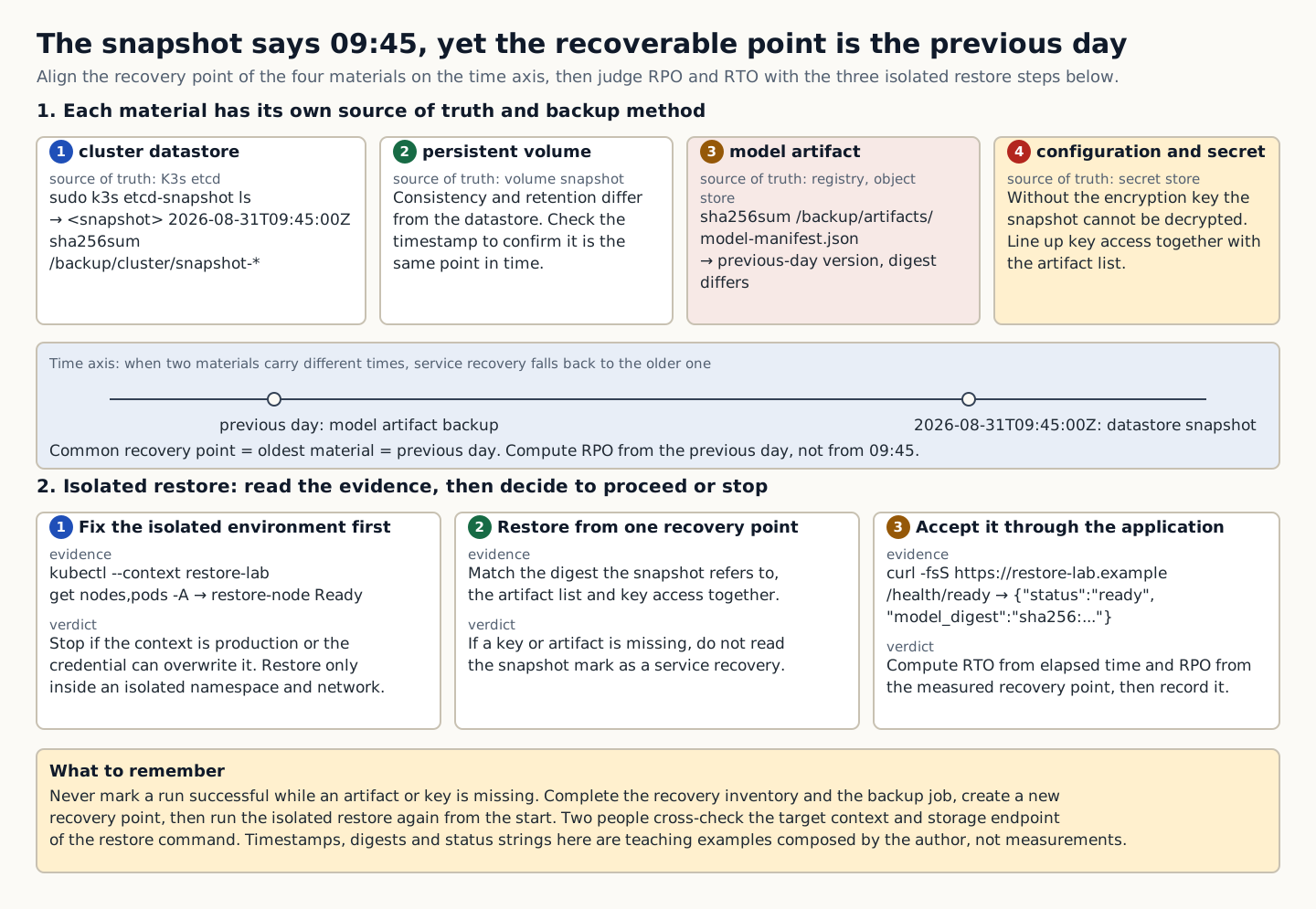
In the training example the datastore snapshot is from 09:45 but the model artifact backup is the previous day's version. Even though both files exist, whether they can be restored as one service revision needs separate confirmation. Align the digest the snapshot references, the artifact list and key access. If required external data is missing, do not treat the snapshot success indicator as service recovery success.

A figure that aligns the recovery point of four backup materials on a time axis and computes RPO and RTO from the evidence and verdict of three isolated restore steps
How to read the figure Reading the four upper boxes from 1, cluster datastore, to 4, configuration · secret, shows that each component has a different source of truth, backup method, and check command. The timeline in the middle places the model artifact backup from the previous day and the datastore snapshot from 2026-08-31T09:45:00Z on one line; when the two components diverge, the common recovery point falls back to the older one, the previous day. The three lower boxes show the order of the isolated restore: in each box, the evidence is the command to read and its output, and the verdict is the criterion for deciding whether to proceed or stop. At step 1, stop if you see a production context or a credential that can overwrite data. At step 2, if a key or artifact is missing, do not treat the snapshot's success indicator as service recovery success. At step 3, calculate RTO from the elapsed time and RPO from the measured recovery point, and record whether each passes. The timestamps, digests, and status strings in the figure are training examples composed by the author, not values measured on real equipment, and the figure does not depict physical cabling or time proportions. Source: composed by the author based on K3s Backup and Restore · Kubernetes Persistent Volumes.
Why does this happen?
RPO is the point in time to which data loss is acceptable, and RTO is the time within which service recovery must be complete. The cluster datastore, persistent volumes, object artifacts, configuration, and secrets each have different consistency and retention characteristics.
When is it a problem?
If you see a missing key or artifact, or a production conflict, there are insufficient grounds to proceed.
Common beginner misconceptions
Have two people cross-check the target context and storage endpoint of the restore command. Do not use credentials that can overwrite production in the lab.
How to verify it yourself
Write down the source of truth and the backup method for each service dependency. Check the backup timestamp, revision, encryption key, retention, and errors.
To summarize this sectionYou succeed when you judge whether RPO/RTO is met, including the measured recovery point, elapsed time, checksum, API acceptance, and any missing dependency.

CHAPTER 1 / 5

Start the checks from the recovery list

Do not guess the cause and start by changing settings. If you group the following evidence into records from the same time window, another operator can reproduce the boundary at which the expected state broke.

1. Write down the source of truth and the backup method for each service dependency. 2. Check the backup timestamp, revision, encryption key, retention, and errors. 3. Restore the datastore and the volumes/artifacts in an isolated namespace/network. 4. Calculate RPO/RTO from the checksum, identity, permission, and API tests and the elapsed time.

CHAPTER 2 / 5

Fix the lab target for backup creation

Commands for reproducing the isolated environment · do not run them in the browser
sudo k3s etcd-snapshot ls
sha256sum /backup/cluster/snapshot-* /backup/artifacts/model-manifest.json
kubectl --context restore-lab get nodes,pods -A
curl -fsS https://restore-lab.example/health/ready

CHAPTER 3 / 5

Distinguish the output of the isolated restore from its meaning

Expected output for training · not an actual measurement
<snapshot> 2026-08-31T09:45:00Z
<hash> snapshot-...
<hash> model-manifest.json
restore-node Ready
{"status":"ready","model_digest":"sha256:..."}

CHAPTER 4 / 5

Decides whether service verification proceeds or stops

CHAPTER 5 / 5

Re-verify recovery of backup and restore

CONCRETE CASES

Fix a recovery plan that has a datastore snapshot but is missing the model artifact and the encryption key.

Run restore tests in an isolated environment rather than overwriting production. Block identity conflicts, calls to external endpoints, and credential reuse before running application acceptance.

Wrong responses and boundaries to check

Have two people cross-check the target context and the storage endpoint of the restore command. Do not use credentials that can overwrite production in the lab.

If an artifact or key is missing, do not mark the restore as successful. Update the recovery inventory and backup job, create a new recovery point, and rerun the isolated restore from the beginning. After recovery, measure again with the same commands and the same success criteria. Do not close an incident just because things appear normal.

INTERACTIVE LAB 1 / 2

Lab 1 · Find the basis for a verdict in the output

Enter values in the browser and check the execution results and the failure and recovery paths. No commands are ever sent to real equipment or the NAS.

Lab scenario:: Fix a recovery plan that has a datastore snapshot but is missing the model artifact and the encryption key. Instructions:: In the browser, read the training output below and write a verdict. Do not send the commands to real equipment. To reproduce the commands separately, prepare an approved isolated environment with the relevant tools and example files. Save the entire output, and if a key or artifact is missing or there is a conflict with production, do not move on to the next change.

<snapshot> 2026-08-31T09:45:00Z
<hash> snapshot-...
<hash> model-manifest.json
restore-node Ready
{"status":"ready","model_digest":"sha256:..."}

The point is not to memorize the values themselves but to confirm that the state and artifacts of the same recovery point are application-ready in an isolated environment. The values shown are reproduced examples for training, not measurements taken on real equipment. Identifiers and values can differ by device, driver, and cluster.

INTERACTIVE LAB 2 / 2

Lab 2 · Plan for stopping and recovery

Enter values in the browser and check the execution results and the failure and recovery paths. No commands are ever sent to real equipment or the NAS.

Have two people cross-check the target context and the storage endpoint of the restore command. Do not use credentials that can overwrite production in the lab.

KEY TERMS

Key terms in this unit

Recovery point
It is the point in time of the data state you can actually restore from a verified backup.

UNIT WORKBOOK

Exercises and worksheets for applying concepts to new situations

Start by checking basic principles, then expand to practical workplace decisions. After submitting an answer, you can see why every option is correct or incorrect, not just the correct answer.

Document the stop conditions and recovery evidence for backup and restore in a work record.

PERSONAL WORKSHEET

A learning worksheet you adapt to your own environment

Your input remains only on the current browser screen and is not stored or transmitted externally. Use categories and pseudonyms instead of actual sensitive information.

OFFICIAL SOURCES

Verify against official sources

Reviewed against official documentation and training output. Commands and performance tests on real hardware are unconfirmed.

CORE UNIT 3 / 4

Upgrades and change management

Build a change plan that includes the canary, the drain, the stop criteria, and the rollback.

Difficulty
Intermediate
Structure
Lessons 5 · Labs 2 · Assessment

Diagrams and tables: composed by the author using each lesson's official primary sources. Find the originals and review dates at the end of that lesson.

PREREQUISITE CHECK

Three things to check before reading

This is not a test of memorized answers. Think about each question first, then open the explanation to review the foundational concepts used in this course.

1Does this unit send commands to real equipment?

No. Read the training output in the browser and make the judgment there. Any separate reproduction is done only in an approved isolated environment.

2What permissions and environment must you confirm before the lab?

Separate lab security-admin and break-glass accounts. Separate the management network from workload namespaces.

3What evidence did you record in the previous unit, "Backup and restore"?

You succeed when you judge whether RPO/RTO is met, including the measured recovery point, elapsed time, checksum, API acceptance, and any missing dependency.

TEXTBOOK GUIDE

Main text that covers each concept from its background to the criteria for judging it

We explain the material section by section so readers new to IT can connect causes and effects without memorizing terms.

  1. Explain the components and failure boundaries of Upgrades and change management with a diagram.
  2. Judge the state of Upgrades and change management from command output and observed values.
  3. Write the stop conditions and recovery evidence for Upgrades and change management into a work record.
Upgrades and change management Lab environment and safety boundaries
HardwareIsolated Kubernetes cluster · backup repository fixture
SoftwareKubernetes 1.31 fixture·K3s snapshot·policy engine
Required permissionsSeparate lab security-admin and break-glass accounts
NetworkingSeparating the management network from workload namespaces

Reviewed against official documentation and training output. Commands and performance tests on real hardware are unconfirmed.

Applies to version: Kubernetes RBAC API rbac.authorization.k8s.io/v1 · K3s v1.31 fixture · Manuscript review date: 2026-09-01

CONCEPT FLOW

How the chapters connect

The chapters are not isolated short answers to memorize. Follow them from left to right to see how each chapter's concepts support the next decision.

  1. 1.Start the checks from the change contract
  2. 2.Fix the lab target for the canary
  3. 3.Distinguish the output of the staged expansion from its meaning
  4. 4.Decides whether the rollback proceeds or stops
  5. 5.Re-verify recovery of Upgrades and change management
Upgrades and change management: the overall map. If you lose track while reading the detailed explanations and chapters below, return to this sequence.

CONTROLLED EXPLANATION

Follow the evidence to check, one step at a time

Current explanation · 1/5 · Start the checks from the change contract

Up next: Fix the lab target for the canary

  1. Start the checks from the change contract

    Do not guess the cause and start by changing settings. If you group the following evidence into records from the same time window, another operator can reproduce the boundary at which the expected state broke.

  2. Fix the lab target for the canary

    Lab scenario:: Add canary, PDB, GPU job drain, and rollback acceptance to the 3-node cluster upgrade plan. Instructions:: In the browser, read the training output below and write a verdict. Do not send the commands to real equipment. To reproduce the commands separately, prepare an approved isolated environment with the relevant tools and example files. Save the entire output, and if the SLO, error budget, or rollback time is exceeded, do not move on to the next change.

  3. Distinguish the output of the staged expansion from its meaning

    The point is not to memorize the values themselves but to confirm that control plane readiness, the disruption budget, node skew, and the application rollout pass the stage gates. The values shown are reproduced examples for training, not measurements taken on real equipment. Identifiers and values can differ by device, driver, and cluster.

  4. Decides whether the rollback proceeds or stops

    The task is complete when you write the preconditions, canary metrics, stage-by-stage Go/No-Go, rollback artifact, and re-verification under the same conditions into the change plan. Record the execution time, target identity, commands used, key output, verdict, and next action together in the result.

  5. Re-verify recovery of Upgrades and change management

    If the stop line is crossed, halt further stages and roll the canary back to the previous revision. If a data migration is involved, use a pre-verified backward path or snapshot restore, then measure the SLO again. After recovery, measure again with the same commands and the same success criteria. Do not close an incident just because things appear normal.

Conceptual explanation 01

An upgrade expands stage by stage as it passes the canary and stop criteria

Canary (limited early rollout): a procedure that applies a change first to a small, representative target, measures the impact, and then expands the rollout.

An upgrade is not a change of package version; it is a change that moves user SLOs, API compatibility, the datastore, and the workloads onto a new revision. You must define not only the success path but also the stop line and the time within which a rollback is actually possible.

A canary gathers evidence about a new revision in a small failure domain that carries representative traffic and dependencies. A drain moves Pods, but it breaks availability if PDBs, local data, long-running GPU jobs, and capacity are not prepared.

Distinguish having a pre-change snapshot from being able to roll back. Check whether the schema or data migration is backward-compatible and whether the previous binary can read the new state.

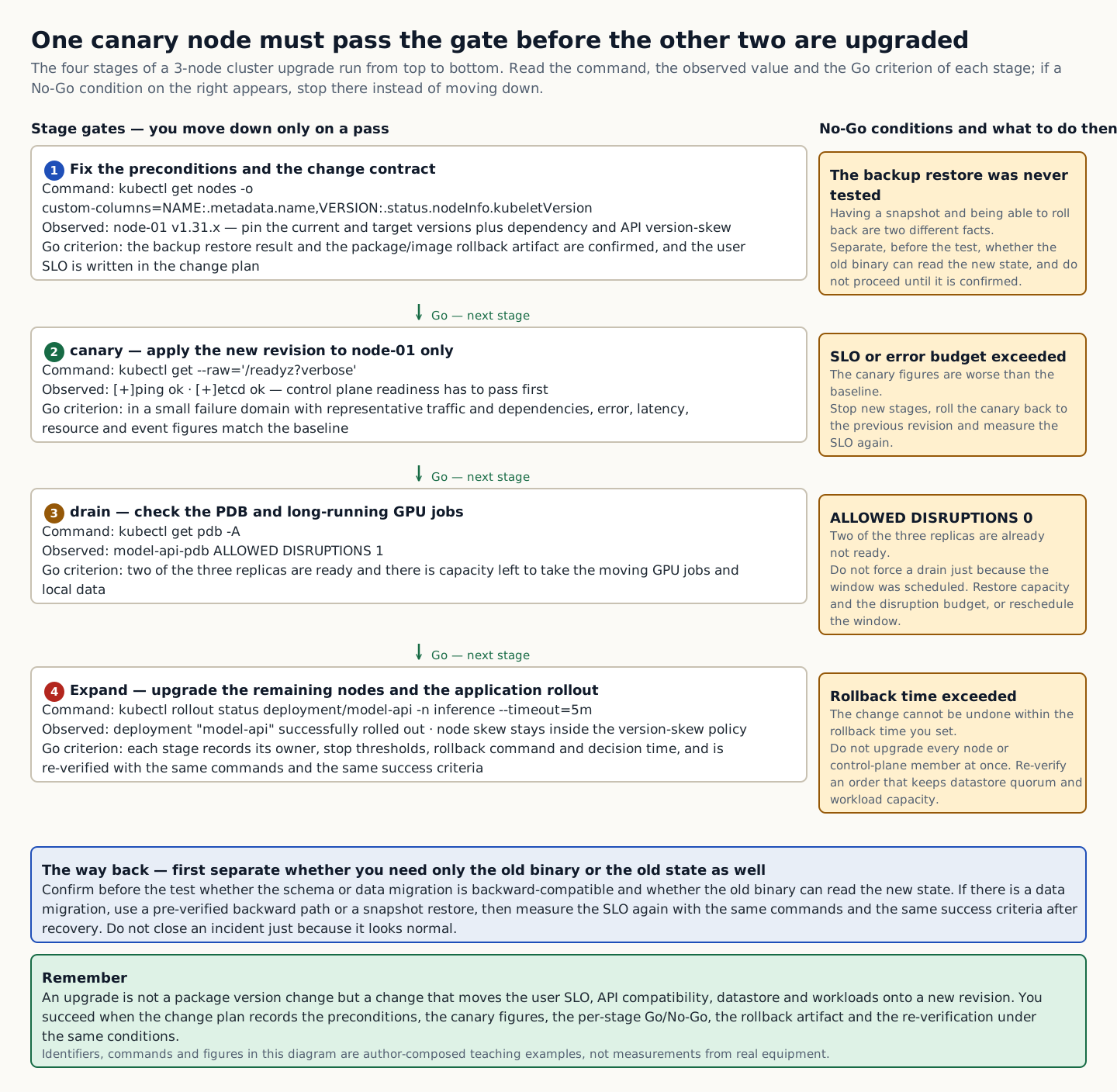
In the training example two of three replicas were already not ready, so the PDB did not allow further disruption. Forcing a drain because the upgrade is scheduled can lose the remaining availability. You must restore the current capacity and disruption budget, or reschedule the work window. Determine before the test whether the rollback needs only the previous binary or the previous state as well.

The four stage gates of a 3-node cluster upgrade with the command, observed value, and Go criterion for each stage, plus the No-Go conditions and the rollback path on the right
How to read the figure Read from top to bottom in the order stage 1 preconditions, 2 canary, 3 drain, and 4 expansion. Each stage box contains the command, the observed value, and the Go criterion that counts as a pass. For example, stage 3 moves on only when kubectl get pdb -A shows ALLOWED DISRUPTIONS 1 and two of the three replicas are ready. The amber box on the right shows the No-Go condition for the stage on the same row and what to do in that case; if the condition is met, stop there rather than moving down to the next stage. The blue box below is the rollback path, which means determining before the test whether a rollback needs only the previous binary or the previous state as well. The green arrows indicate that you move to the next stage only after a pass, and they can be read from the text in the boxes without distinguishing colors. The figure does not depict time proportions or physical cabling. The identifiers, commands, and numbers in the figure are training examples composed by the author, not results measured on real equipment. Source: composed by the author based on Kubernetes Version Skew Policy · Kubernetes Rolling Update Deployment.
Why does this happen?
A canary gathers evidence about a new revision in a small failure domain that carries representative traffic and dependencies. A drain moves Pods, but it breaks availability if PDBs, local data, long-running GPU jobs, and capacity are not prepared.
When is it a problem?
If the SLO, error budget, or rollback time is exceeded, there are insufficient grounds to proceed.
Common beginner misconceptions
Do not upgrade every node or every control-plane member at once. Verify an order that preserves datastore quorum and workload capacity.
How to verify it yourself
Pin the current and target versions and the dependency and API version skew. Check the backup restore result and the package/image rollback artifacts.
To summarize this sectionYou succeed when your change plan includes the prerequisites, canary figures, per-stage Go/No-Go, rollback artifacts, and re-verification under identical conditions.

CHAPTER 1 / 5

Start the checks from the change contract

Do not guess the cause and start by changing settings. If you group the following evidence into records from the same time window, another operator can reproduce the boundary at which the expected state broke.

1. Pin the current and target versions, along with dependency and API version-skew. 2. Verify the backup restore result and the package/image rollback artifact. 3. Compare the canary error, latency, resource usage, and events with the baseline. 4. Record the owner, abort threshold, rollback command, and decision time for each stage.

CHAPTER 2 / 5

Fix the lab target for the canary

Commands for reproducing the isolated environment · do not run them in the browser
kubectl get --raw='/readyz?verbose'
kubectl get pdb -A
kubectl get nodes -o custom-columns=NAME:.metadata.name,VERSION:.status.nodeInfo.kubeletVersion
kubectl rollout status deployment/model-api -n inference --timeout=5m

CHAPTER 3 / 5

Distinguish the output of the staged expansion from its meaning

Expected output for training · not an actual measurement
[+]ping ok
[+]etcd ok
model-api-pdb ALLOWED DISRUPTIONS 1
node-01 v1.31.x
deployment "model-api" successfully rolled out

CHAPTER 4 / 5

Decides whether the rollback proceeds or stops

CHAPTER 5 / 5

Re-verify recovery of Upgrades and change management

CONCRETE CASES

Add canary, PDB, GPU job drain, and rollback acceptance to the 3-node cluster upgrade plan.

Distinguish having a pre-change snapshot from being able to roll back. Check whether the schema or data migration is backward-compatible and whether the previous binary can read the new state.

Wrong responses and boundaries to check

Do not upgrade every node or every control-plane member at once. Verify an order that preserves datastore quorum and workload capacity.

If the stop line is crossed, halt further stages and roll the canary back to the previous revision. If a data migration is involved, use a pre-verified backward path or snapshot restore, then measure the SLO again. After recovery, measure again with the same commands and the same success criteria. Do not close an incident just because things appear normal.

INTERACTIVE LAB 1 / 2

Lab 1 · Find the basis for a verdict in the output

Enter values in the browser and check the execution results and the failure and recovery paths. No commands are ever sent to real equipment or the NAS.

Lab scenario:: Add canary, PDB, GPU job drain, and rollback acceptance to the 3-node cluster upgrade plan. Instructions:: In the browser, read the training output below and write a verdict. Do not send the commands to real equipment. To reproduce the commands separately, prepare an approved isolated environment with the relevant tools and example files. Save the entire output, and if the SLO, error budget, or rollback time is exceeded, do not move on to the next change.

[+]ping ok
[+]etcd ok
model-api-pdb ALLOWED DISRUPTIONS 1
node-01 v1.31.x
deployment "model-api" successfully rolled out

The point is not to memorize the values themselves but to confirm that control plane readiness, the disruption budget, node skew, and the application rollout pass the stage gates. The values shown are reproduced examples for training, not measurements taken on real equipment. Identifiers and values can differ by device, driver, and cluster.

INTERACTIVE LAB 2 / 2

Lab 2 · Plan for stopping and recovery

Enter values in the browser and check the execution results and the failure and recovery paths. No commands are ever sent to real equipment or the NAS.

Do not upgrade every node or every control-plane member at once. Verify an order that preserves datastore quorum and workload capacity.

KEY TERMS

Key terms in this unit

Canary (limited early rollout)
A procedure that applies a change first to a small, representative target, measures the impact, and then expands.

UNIT WORKBOOK

Exercises and worksheets for applying concepts to new situations

Start by checking basic principles, then expand to practical workplace decisions. After submitting an answer, you can see why every option is correct or incorrect, not just the correct answer.

Write the stop conditions and recovery evidence for Upgrades and change management into a work record.

PERSONAL WORKSHEET

A learning worksheet you adapt to your own environment

Your input remains only on the current browser screen and is not stored or transmitted externally. Use categories and pseudonyms instead of actual sensitive information.

OFFICIAL SOURCES

Verify against official sources

Reviewed against official documentation and training output. Commands and performance tests on real hardware are unconfirmed.

CORE UNIT 4 / 4

Platform security baseline

Apply image, workload, network, and audit policies in stages.

Difficulty
Intermediate
Structure
Lessons 5 · Labs 2 · Assessment

Diagrams and tables: composed by the author using each lesson's official primary sources. Find the originals and review dates at the end of that lesson.

PREREQUISITE CHECK

Three things to check before reading

This is not a test of memorized answers. Think about each question first, then open the explanation to review the foundational concepts used in this course.

1Does this unit send commands to real equipment?

No. Read the training output in the browser and make the judgment there. Any separate reproduction is done only in an approved isolated environment.

2What permissions and environment must you confirm before the lab?

Separate lab security-admin and break-glass accounts. Separate the management network from workload namespaces.

3What evidence did you record in the previous unit, "Upgrades and change management"?

The task is complete when you write the preconditions, canary metrics, stage-by-stage Go/No-Go, rollback artifact, and re-verification under the same conditions into the change plan.

TEXTBOOK GUIDE

Main text that covers each concept from its background to the criteria for judging it

We explain the material section by section so readers new to IT can connect causes and effects without memorizing terms.

  1. Explain the components and failure boundaries of the Platform security baseline with a diagram.
  2. Judge the state of the Platform security baseline from command output and observed values.
  3. Write the stop conditions and recovery evidence for the Platform security baseline into a work record.
Platform security baseline Lab environment and safety boundaries
HardwareIsolated Kubernetes cluster · backup repository fixture
SoftwareKubernetes 1.31 fixture·K3s snapshot·policy engine
Required permissionsSeparate lab security-admin and break-glass accounts
NetworkingSeparating the management network from workload namespaces

Reviewed against official documentation and training output. Commands and performance tests on real hardware are unconfirmed.

Applies to version: Kubernetes RBAC API rbac.authorization.k8s.io/v1 · K3s v1.31 fixture · Manuscript review date: 2026-09-01

CONCEPT FLOW

How the chapters connect

The chapters are not isolated short answers to memorize. Follow them from left to right to see how each chapter's concepts support the next decision.

  1. 1.Start the checks at the artifact
  2. 2.Pins down the lab target for the workload
  3. 3.Distinguishes network output from its meaning
  4. 4.Decide whether the audit and response continue or stop
  5. 5.Re-verify recovery of the Platform security baseline
Platform security baseline: the overall map. If you lose track while reading the detailed explanations and chapters below, return to this sequence.

CONTROLLED EXPLANATION

Follow the evidence to check, one step at a time

Current explanation · 1/5 · Start the checks at the artifact

Up next: Pins down the lab target for the workload

  1. Start the checks at the artifact

    Do not guess the cause and start by changing settings. If you group the following evidence into records from the same time window, another operator can reproduce the boundary at which the expected state broke.

  2. Pins down the lab target for the workload

    Lab scenario:: Move an inference Pod that is privileged, uses hostPath, and has unrestricted egress to the restricted baseline step by step. Instructions:: In the browser, read the training output below and write a verdict. Do not send the commands to real equipment. To reproduce the commands separately, prepare an approved isolated environment with the relevant tools and example files. Save the entire output, and if you see an unowned exception, secret exposure, or a deny regression, do not move on to the next change.

  3. Distinguishes network output from its meaning

    The point is not to memorize the values themselves but to confirm that the workload permission, network, and interactive exec boundaries match the intent of the policy. The values shown are reproduced examples for training, not measurements taken on real equipment. Identifiers and values can differ by device, driver, and cluster.

  4. Decide whether the audit and response continue or stop

    You succeed when you produce a baseline report that includes the current gaps, dry-run impact, canary rollout, allow/deny and audit evidence, rollback, and exception expiry. Record the execution time, target identity, commands used, key output, verdict, and next action together in the result.

  5. Re-verify recovery of the Platform security baseline

    If healthy traffic is cut off, roll back the canary revision and review the observed tuples instead of deleting the entire policy. Add a minimal allow rule as a source-controlled change, and repeat the denial tests as well. After recovery, measure again with the same commands and the same success criteria. Do not close an incident just because things appear normal.

Conceptual explanation 01

Verify the overlapping security boundaries from artifact to audit

Default deny: a policy principle that blocks any access other than the paths explicitly permitted.

Platform security is not one scanner but the overlapping boundaries of artifact identity, workload privileges, network reachability, secrets, nodes, and auditing. Even if one layer is bypassed, the others must reduce the blast radius and the time to detection.

A default-deny network policy and a restricted workload policy are powerful, but enforcing them immediately without observing current traffic and capability dependencies will break healthy services. Expand them through audit/dry-run, canary, and exceptions with an owner and an expiry.

Actual allow/deny tests and detection evidence matter more than the number of policies. Link the image digest and signature; non-root, capability, and seccomp settings; egress; secret mounts; and audit events to the release revision.

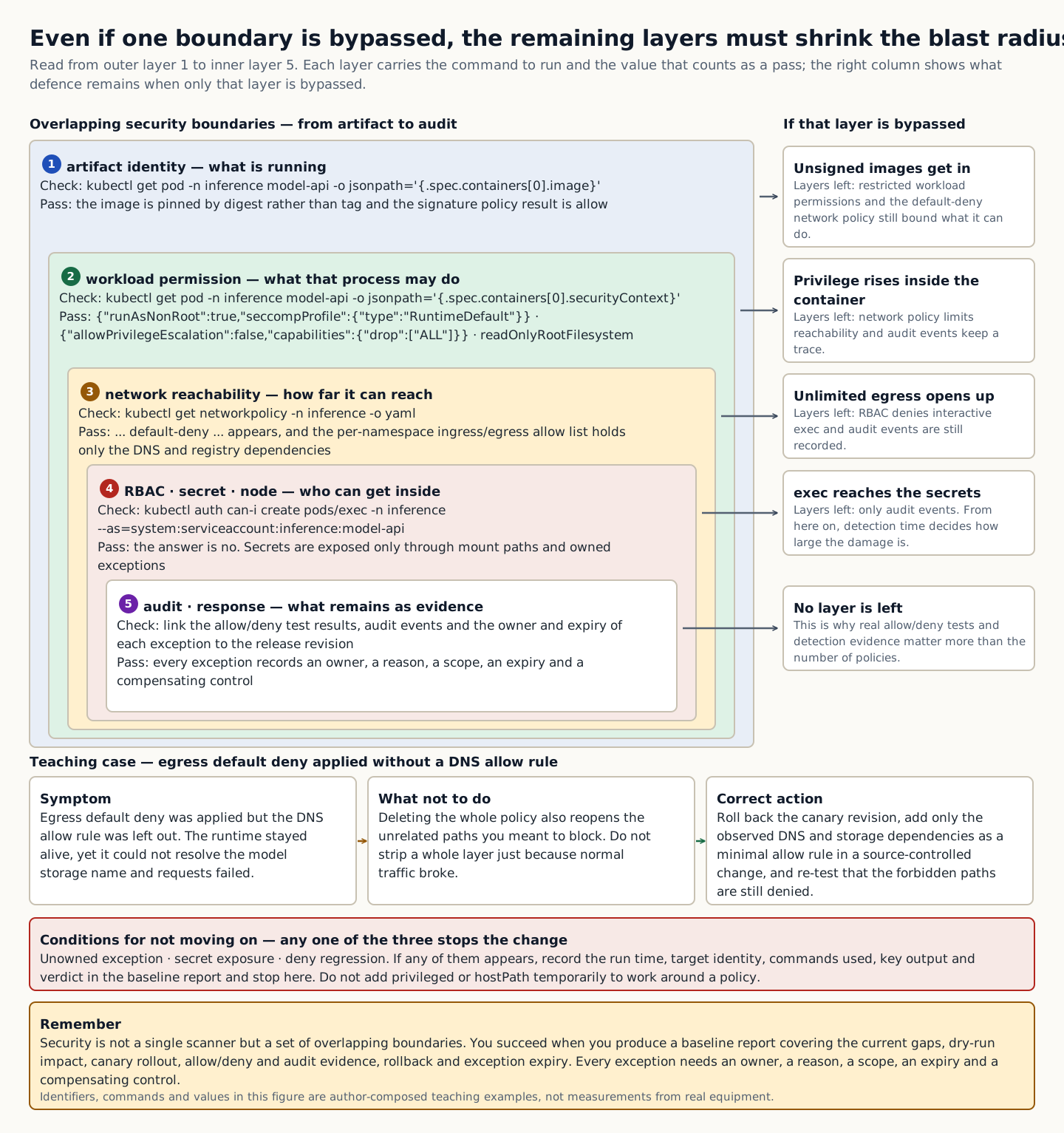
In the training example a default-deny egress policy was applied but the DNS allow rule was omitted. The runtime stayed alive, but requests failed because the model storage name could not be resolved. Deleting the whole policy also opens the unrelated paths you meant to block. Allow only the observed DNS and storage dependencies with the narrowest scope, and test at the same time that the prohibited paths are still denied.

Five overlapping boundaries from artifact identity to audit, with the check command and pass value for each layer and the defense that remains when only that layer is breached
How to read the figure Read in order from outer layer 1, artifact identity, to inner layer 5, audit. Each layer lists a check command and the value that counts as a pass; for example, layer 2 passes when securityContext shows runAsNonRoot true and capabilities drop ALL. The box on the right shows the defenses that remain when only that layer is breached, and fewer layers remain the further inward you go. The case below shows, from left to right, the symptom when a default-deny egress policy omits the DNS allow rule, the wrong action of deleting the whole policy, and the correct action of allowing only the observed dependencies with the narrowest scope. The three conditions in the red box (an unowned exception, secret exposure, and a deny regression) mean that if even one appears, the next change does not proceed, and they can be read without distinguishing colors. The size of each layer shows only containment and check order, not the size of the risk. The identifiers, commands, and values in the figure are training examples composed by the author, not results measured on real equipment. Source: composed by the author based on Kubernetes Network Policies · Kubernetes Pod Security Standards · Kubernetes Using RBAC Authorization.
Why does this happen?
A default-deny network policy and a restricted workload policy are powerful, but enforcing them immediately without observing the current traffic and capability dependencies cuts off healthy services. Expand through audit/dry-run, a canary, and exceptions with an owner and an expiry.
When is it a problem?
If you see unowned exceptions, secret exposure, or a deny regression, there are insufficient grounds to proceed.
Common beginner misconceptions
Do not temporarily add privileged or hostPath to work around a security policy and then leave it in place. An exception needs an owner, a reason, a scope, an expiry, and compensating controls.
How to verify it yourself
Check the deployed image digest and the signature policy result. Look at runAsNonRoot, capability drop, seccomp, and readOnlyRootFilesystem.
To summarize this sectionYou succeed when you produce a baseline report that includes the current gap, the dry-run impact, the canary rollout, the allow/deny and audit evidence, the rollback, and the expiry of exceptions.

CHAPTER 1 / 5

Start the checks at the artifact

Do not guess the cause and start by changing settings. If you group the following evidence into records from the same time window, another operator can reproduce the boundary at which the expected state broke.

1. Verify the deployed image digest and the signature policy result. 2. Check runAsNonRoot, capability drop, seccomp, and readOnlyRootFilesystem. 3. Measure the ingress/egress allow list per namespace and the DNS and registry dependencies. 4. Link the allow/deny tests to the audit events and to the exception owner and expiry.

CHAPTER 2 / 5

Pins down the lab target for the workload

Commands for reproducing the isolated environment · do not run them in the browser
kubectl get pod -n inference model-api -o jsonpath='{.spec.securityContext}{"\n"}{.spec.containers[0].securityContext}{"\n"}'
kubectl get networkpolicy -n inference -o yaml
kubectl auth can-i create pods/exec -n inference --as=system:serviceaccount:inference:model-api

CHAPTER 3 / 5

Distinguishes network output from its meaning

Expected output for training · not an actual measurement
{"runAsNonRoot":true,"seccompProfile":{"type":"RuntimeDefault"}}
{"allowPrivilegeEscalation":false,"capabilities":{"drop":["ALL"]}}
... default-deny ...
no

CHAPTER 4 / 5

Decide whether the audit and response continue or stop

CHAPTER 5 / 5

Re-verify recovery of the Platform security baseline

CONCRETE CASES

Move an inference Pod that has privileged, hostPath, and unrestricted egress to a restricted baseline in stages.

Actual allow/deny tests and detection evidence matter more than the number of policies. Link the image digest and signature; non-root, capability, and seccomp settings; egress; secret mounts; and audit events to the release revision.

Wrong responses and boundaries to check

Do not add privileged or hostPath temporarily to work around a security policy and then leave it in place. An exception needs an owner, a reason, a scope, an expiry and compensating controls.

If healthy traffic is cut off, roll back the canary revision and review the observed tuples instead of deleting the entire policy. Add a minimal allow rule as a source-controlled change, and repeat the denial tests as well. After recovery, measure again with the same commands and the same success criteria. Do not close an incident just because things appear normal.

INTERACTIVE LAB 1 / 2

Lab 1 · Find the basis for a verdict in the output

Enter values in the browser and check the execution results and the failure and recovery paths. No commands are ever sent to real equipment or the NAS.

Lab scenario:: Move an inference Pod that is privileged, uses hostPath, and has unrestricted egress to the restricted baseline step by step. Instructions:: In the browser, read the training output below and write a verdict. Do not send the commands to real equipment. To reproduce the commands separately, prepare an approved isolated environment with the relevant tools and example files. Save the entire output, and if you see an unowned exception, secret exposure, or a deny regression, do not move on to the next change.

{"runAsNonRoot":true,"seccompProfile":{"type":"RuntimeDefault"}}
{"allowPrivilegeEscalation":false,"capabilities":{"drop":["ALL"]}}
... default-deny ...
no

The point is not to memorize the values themselves but to confirm that the workload permission, network, and interactive exec boundaries match the intent of the policy. The values shown are reproduced examples for training, not measurements taken on real equipment. Identifiers and values can differ by device, driver, and cluster.

INTERACTIVE LAB 2 / 2

Lab 2 · Plan for stopping and recovery

Enter values in the browser and check the execution results and the failure and recovery paths. No commands are ever sent to real equipment or the NAS.

Do not add privileged or hostPath temporarily to work around a security policy and then leave it in place. An exception needs an owner, a reason, a scope, an expiry and compensating controls.

KEY TERMS

Key terms in this unit

Default deny
The policy principle of blocking all access except through explicitly allowed paths.

UNIT WORKBOOK

Exercises and worksheets for applying concepts to new situations

Start by checking basic principles, then expand to practical workplace decisions. After submitting an answer, you can see why every option is correct or incorrect, not just the correct answer.

Write the stop conditions and recovery evidence for the Platform security baseline into a work record.

PERSONAL WORKSHEET

A learning worksheet you adapt to your own environment

Your input remains only on the current browser screen and is not stored or transmitted externally. Use categories and pseudonyms instead of actual sensitive information.

OFFICIAL SOURCES

Verify against official sources

Reviewed against official documentation and training output. Commands and performance tests on real hardware are unconfirmed.

DECISION ACTIVITY

During an urgent incident a developer requests cluster-admin. What is the correct response?

First write down the evidence you need and the stop criteria, then choose a verdict.

Choose an answer

THREE-LEVEL ASSESSMENT

From basic principles to operational decisions

When you submit an answer you can see why every option is right or wrong.

Basic Question 1

What does a RoleBinding do in RBAC?

Choose an answer
Apply Question 2

What do an RPO of 15 minutes and an RTO of 60 minutes mean?

Choose an answer
Capstone Question 3

What is the safe order for applying policies in production?

Choose an answer

LEARNING RECORD

Have you reviewed the text, decision activities, and all explanations?

Completion status is stored only in this browser.